Router and Modem Spectrum: Side-by-Side Comparison
Compare Spectrum's gateway with a standalone modem and router setup. Learn the differences, setup steps, costs, and performance considerations to choose the best solution for your home network.


TL;DR: For most homes, using a separate modem and router provides better control, faster upgrades, and stronger Wi‑Fi coverage, especially when Spectrum is the ISP. Spectrum-supplied gateways offer simplicity and easy setup but can limit customization and long-term flexibility. If you want peak performance and future-proofing, choose separate devices; if convenience is primary, a gateway may suffice.
Why Spectrum Context Matters
Understanding the router and modem spectrum ecosystem starts with recognizing how Spectrum delivers internet access. The typical home network relies on two critical components: a modem that translates the cable network into a digital signal for your home, and a router that creates the local network, assigns IP addresses, and manages Wi‑Fi. In some markets, Spectrum also offers a single device that combines both roles (a gateway). The choice between separate devices and an integrated gateway shapes performance, security, ease of setup, and long-term flexibility, especially as you scale devices, gain streaming activity, or add work-from-home needs. The term router and modem spectrum signals a broad decision: do you want total control over hardware and firmware, or do you prefer a plug‑and‑play solution that minimizes tinkering? Whatever your preference, grounding your choice in your space, internet usage, and future plans is essential.
From a technical standpoint, Spectrum’s network uses DOCSIS standards to handle data transfer over cable. A hybrid approach—combining your own router with Spectrum’s modem in bridge mode—can yield the best of both worlds: the simplicity of a gateway when desired, plus the power to upgrade your Wi‑Fi with a modern router when needed.
Key Differences Between a Modem and a Router
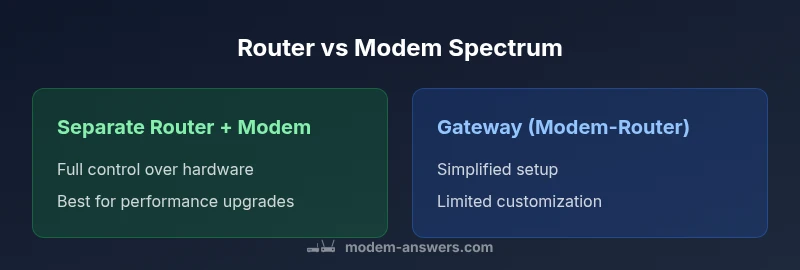
The two devices in a home network play distinct roles. A modem connects to the ISP’s infrastructure and decodes the signal for your local network. A router distributes that connection to all devices within your home, manages traffic, and creates a secure local network. A gateway merges both functions into a single box. The core differentiator is control versus convenience. With separate devices, you can upgrade your router for faster Wi‑Fi, implement advanced features (QoS, mesh networking, guest networks), and tailor firewall rules. A gateway, by contrast, simplifies setup and reduces clutter, but you trade off some control and potential performance ceiling. In the context of Spectrum, a common path is to use Spectrum’s modem (or gateway) while choosing your own high‑quality router to optimize wireless performance and coverage across rooms or levels.
How Spectrum Typically Provides Equipment
Spectrum offers both rental gateways and the option to BYO (bring your own) equipment in many markets. Renting a gateway provides plug‑and‑play setup, automatic firmware updates, and basic parental controls without extra work. This is especially appealing for renters or busy households who want reliable internet with minimal configuration. Owning your own modem (that is compatible with Spectrum) plus a separate router gives you customization power and potential long-term cost savings, since rental fees accumulate over time. Before choosing, verify modem compatibility with Spectrum’s service tiers and confirm whether bridge mode is allowed for your account if you plan to use your own router.
Should You Use a Standalone Modem and Router?
Your decision should start with usage patterns. If you stream in 4K, game online, or support multiple smart devices, separate devices generally offer stronger performance and more reliable coverage, especially in larger homes. If you live in a smaller apartment and value simplicity, a gateway can meet most needs with less setup time. Also consider future plans: will you expand with a mesh system, need advanced security, or require specific port configurations? In any case, ensure you understand Spectrum's policies on bridge mode and any limitations on third‑party devices before committing.
For households that demand ongoing upgrades and the flexibility to adjust networks as devices proliferate, investing in a good router paired with a compatible modem tends to yield the best long‑term value. Spectrum's support resources and community forums can help you map out a compatible configuration before buying.
Performance Implications: Speed, Latency, and Coverage
Performance hinges on multiple factors beyond the device itself. A high‑quality router can dramatically improve Wi‑Fi range, signal stability, and throughput, especially when paired with a modern DOCSIS 3.1 or 3.0 modem. Placing the router strategically—central location, elevated position, free of obstructions—yields better coverage than relying on a gateway placed behind furniture. Latency can vary with the number of hops and the efficiency of NAT (Network Address Translation). Separate devices give you more granular control of QoS (quality of service), which prioritizes work devices or gaming traffic when the network is busy. If you opt for a gateway, ensure it supports the latest Wi‑Fi standards and consider whether additional mesh nodes could improve coverage in dead zones.
Setup and Configuration: Bridging and NAT Considerations
Setting up a separate modem and router often requires enabling bridge mode on the modem to avoid double NAT, which can cause issues with some services (VPNs, gaming, and port forwarding). The exact steps vary by model, but the general approach is to access the modem’s admin interface, enable bridge mode, then connect your router and configure the WAN settings. When using a gateway, you can typically rely on the device’s built‑in NAT and firewall, but you may lose some advanced features unless you purchase a capable router to complement it. If you’re new to networking, starting with Spectrum’s recommended configuration (gateway for simplicity or bridge mode with BYO router) can prevent common pitfalls and deliver a smoother setup experience.
Double NAT is a common pitfall in mixed configurations. If you encounter connection drops, consider placing the gateway in bridge mode or turning off NAT on the separate router, depending on your topology and desired features.
Cost Considerations: Upfront vs Ongoing Fees
Cost is a major driver of the decision. A standalone modem and router typically involves higher upfront hardware costs but can be cheaper over several years, particularly if you already own existing devices or can borrow from a previous setup. Spectrum rental gateways charge ongoing monthly fees, which can accumulate to significant sums over time. When comparing costs, include the price of the devices, potential networking upgrades, and the long‑term value of ownership. If you expect to upgrade routers or expand to mesh networking, owning the hardware becomes particularly attractive. In contrast, if you expect to move soon or prefer a maintenance‑free option, a Spectrum gateway may be preferable despite higher ongoing costs.
Always check current rental rates and any promotional offers, then run a simple total‑cost of ownership analysis over a 2–3 year horizon.
When to Consider Spectrum‑Supplied Gateway vs Your Own Equipment
If your priority is simplicity, minimal management, and stable service without much tinkering, Spectrum’s gateway provides a straightforward path. For enthusiasts, power users, or households with heavy streaming, gaming, or smart‑home devices, a separate modem and router—paired with a mesh system if needed—offers better performance and control. Additionally, if you want to customize security settings, implement guest networks, or separate work traffic from home devices, owning and configuring your own router can yield substantial benefits. Always ensure the chosen equipment is compatible with Spectrum’s service and that bridge mode is available if you intend to BYO devices.
Finally, consider the space where your network lives: a larger home benefits more from a well‑placed router and possibly mesh nodes, while a small apartment may meet your needs with a capable gateway.
Practical Setup Checklist
- Confirm your space and device needs: number of rooms, walls, and device count. 2) Check Spectrum’s list of compatible modems for BYO setups and confirm bridge mode availability. 3) Decide on a router that supports current Wi‑Fi standards (Wi‑Fi 6 or 6E if possible) and enough Ethernet ports for your devices. 4) Plan a placement strategy for coverage, ideally central and elevated. 5) If using bridging, follow the modem’s bridge mode instructions and configure your router’s WAN settings accordingly. 6) Enable security features: WPA3, guest network, and regular firmware updates. 7) Test speeds wirelessly and wired, then optimize channels and placement as needed.
Real-World Scenarios: Small Apartment, Family Home, Home Office
In a small apartment with a handful of devices, Spectrum’s gateway can deliver solid coverage with minimal setup. For a multi‑room home with several streaming devices and a home office, a separate modem and router—potentially a mesh system—often delivers more reliable performance and easier troubleshooting. In a home office scenario with high upload demand (video conferencing, large file transfers), a dedicated router with QoS rules and a high‑quality modem can help maintain stable performance during peak hours. The key is anchoring your choice to anticipated device count, coverage area, and the need for advanced features like guest networks or time‑based access controls.
Troubleshooting Tips for Mixed Setups
When issues arise in mixed setups, start with simple checks: confirm all cables are firmly connected, verify bridge mode status if BYO, and run speed tests on both wired and wireless connections. If you notice inconsistent performance, adjust router placement, update firmware, or upgrade to a mesh system. For Spectrum‑specific advice, consult official guidance to verify compatibility and bridge mode status for your account. Finally, document your network topology so future changes won’t disrupt critical services.
Comparison
| Feature | Separate Router + Modem | Gateway (Modem-Router) |
|---|---|---|
| Device management | Full control with independent devices | Unified management via a single device |
| Wi-Fi performance | Upgradeable routing hardware; can exceed gateway limitations | Typically solid but often bound by gateway specs |
| Ethernet ports | Modem: 1-2, Router: 2-4; total often 4-8 | Gateway: 2-4 ports total |
| Future-proofing | Easier to upgrade just the router or modem as needed | Less flexible; upgrades usually require replacing the gateway |
| Cost/Value | Higher upfront costs; long-term ownership pays off | Lower upfront due to rental; ongoing fees accumulate |
| Setup complexity | More steps (bridge mode, network config) | Simpler, fewer steps to get online |
| Spectrum compatibility | Ensure modem supports Spectrum plans and bridge mode if needed | Gateway compatibility is generally high, but check model support |
| Security features | Custom firewall, advanced QoS, and parental controls via router | Built‑in security features with limited customization |
Positives
- Greater freedom to customize and upgrade
- Potential for higher Wi‑Fi performance with quality routers
- Better long-term value if you own both devices
- More flexible placement and features (mesh, QoS, guest networks)
What's Bad
- Higher upfront cost and more setup steps
- Two devices to manage and update
- Potential compatibility pitfalls if not bridging correctly
- Requires more knowledge to optimize
Separate router + modem is generally the best long-term choice for performance and flexibility
Opt for independent devices if you want control and future-proofing. A gateway is ideal for simplicity and quick setup, but expect limited customization as networks grow.
FAQ
What is the difference between a modem and a router?
A modem connects to your ISP and translates the signal for your network. A router creates the local network, assigns IPs, and manages Wi‑Fi. In a gateway, both roles are combined in one device. Understanding these roles helps tailor your setup for speed, coverage, and security.
A modem connects you to the internet, a router creates your home network. A gateway does both in one box.
Can I use my own router with Spectrum?
Yes, you can typically use your own router with Spectrum by putting the modem in bridge mode and connecting your router. This preserves control over Wi‑Fi settings and features while keeping the internet connection active. Be sure to confirm bridge mode availability for your account and device compatibility in Spectrum's documentation.
You can usually use your own router by enabling bridge mode on Spectrum's modem. Just check compatibility.
Should I rent Spectrum's gateway or buy my own equipment?
Renting a gateway is convenient and hassle-free, with automatic updates and minimal setup. Buying your own modem and router can save money over time and offer greater control, but it requires more setup and maintenance. Consider your space, technical comfort, and long-term plans when deciding.
Rent for simplicity, buy for long-term control and potential savings.
What is DOCSIS and why does it matter?
DOCSIS defines the data transfer protocol over cable systems. A modem’s DOCSIS version (3.0, 3.1, etc.) influences speed and efficiency, while the router handles inside‑house routing. Higher DOCSIS compatibility typically supports faster, more reliable service when paired with a compatible router.
DOCSIS is the cable data standard; newer versions usually mean faster speeds.
How do I bridge mode on a Spectrum modem?
Log in to the modem’s admin page, enable bridge mode, and connect your own router to the modem. Disable any built‑in routing features on the gateway if you want full control on the router. Always save settings and reboot devices after changes.
Enable bridge mode in the modem's settings, then connect your router and reboot.
Is Spectrum support good for third-party routers?
Spectrum generally supports third‑party routers when used with a bridge‑mode modem, but some features may be limited or require manual configuration. For best results, consult Spectrum’s official guidance and verify model compatibility before purchasing.
Third‑party routers work, but some features may be limited; check Spectrum docs.
Key Takeaways
- Define your priorities: control vs. simplicity
- Check Spectrum compatibility and bridge mode if planning a gateway
- Budget long-term: calculate upfront vs rental costs
- Invest in a modern router for future-proofing