Cox Compatible Modem Router Combo: A Practical 2026 Guide
Learn how to choose a Cox compatible modem router combo, verify Cox compatibility, compare key features, and optimize setup for a reliable home network in 2026.


A Cox compatible modem router combo is a single device approved by Cox to provide both modem and wireless router functionality in one enclosure. These gateways support Cox's network standards, offered speed tiers, and security features, reducing equipment clutter. When shopping, verify the model is on Cox's approved device list, confirm your service tier, and ensure the device supports features you need (Wi‑Fi 6, DOCSIS standard, and parental controls).
What is a Cox compatible modem router combo and why it matters
A Cox compatible modem router combo is a single device approved by Cox to provide both modem and wireless router functionality in one enclosure. In practice, this means you plug the coax cable into the gateway, connect a single device to power, and begin your internet service with built‑in Wi‑Fi. For homeowners and renters, this can reduce cable clutter, simplify setup, and keep your home network manageable. The Modem Answers team emphasizes that using a Cox‑approved device helps ensure reliable activation, consistent firmware updates, and compatibility with Cox's speed tiers. When you rotate through models, you’ll notice two main families: DOCSIS 3.1 gateways offering faster throughput and more robust network features, and older DOCSIS 3.0 gateways that might still work but offer fewer future‑proofing benefits. If your plan is to upgrade or expand coverage, a Cox compatible modem router combo often represents the easiest path to a clean, centralized network. According to Modem Answers, this approach reduces common troubleshooting steps and helps align hardware with Cox’s current service policies.
How to verify Cox compatibility
Before purchasing, verify that a device is on Cox’s official approved devices list. The Modem Answers team consistently notes that sticking to Cox‑approved models minimizes activation issues and warranty disputes. Start at Cox’s support site and search for the exact model number to confirm compatibility with your service address and tier. Look for features that matter to you: DOCSIS version (3.1 preferred for future speeds), Wi‑Fi generation (Wi‑Fi 6 or newer for better coverage), and security features such as built‑in firewalls and parental controls. Some Cox homes also rely on voice services or specific modem features; if those apply, double‑check that the gateway supports them. If you’re unsure, call Cox support or visit a local retailer with the model in hand to confirm activation expectations. As a rule of thumb, only buy devices that explicitly carry Cox’s approved status to minimize activation issues and warranty disputes.
Key features to compare in Cox‑compatible devices
When comparing Cox compatible modem router combos, focus on several core attributes. First, the DOCSIS standard matters: 3.1 devices are typically faster and more future‑proof than 3.0. Next, Wi‑Fi performance matters for busy homes; look for at least Wi‑Fi 6, with tri‑band or robust mesh support if your space is large. Security is not optional: check for automatic firmware updates, built‑in firewall, guest network, and parental controls. Consider hardware specs such as processor speed and RAM, which influence how well the device handles multiple devices and streaming. Also verify feature parity with Cox service tiers; some providers have caps or distinct requirements for higher‑speed plans. Finally, check whether the device can be placed in bridge mode if you want to use your own router later, and ensure it supports IPv6 for future compatibility.
Installation and setup tips for a Cox compatible gateway
Begin by locating your coax wall outlet and the gateway’s power source. Connect the coax to the gateway, plug in the power, and power on the device. If activation doesn’t start automatically, access the gateway’s admin page and start the Cox activation process or call Cox support for assistance. For a simple home network, enable the built‑in Wi‑Fi and set a strong network name and password. If you plan to use your own router, enable bridge mode on the Cox gateway and connect your secondary router to the gateway’s Ethernet port. Finally, update firmware when prompted and enable automatic updates to maintain security and performance.
Common pitfalls and how to avoid them
A frequent pitfall is skipping the official Cox approved device list and attempting to activate a non‑listed model, which can lead to activation delays or loss of support. Another issue is expecting the gateway to deliver perfect coverage in an oversized home without considering placement and potential mesh expansion. Ensure the device is placed centrally, elevated, away from metal obstacles, and not obstructed by dense furniture. Firmware updates are essential, but some users delay updates, which can leave devices vulnerable. Finally, if you plan to lease a separate router or add a mesh system, confirm bridge mode compatibility and the correct boot sequence to avoid double NAT problems.
Real-world shopping plan: Step-by-step guide to selecting the right Cox compatible modem router combo
- List must‑haves for your home (coverage, speeds, parental controls, VPN support).
- Check Cox’s official approved devices list for exact model numbers.
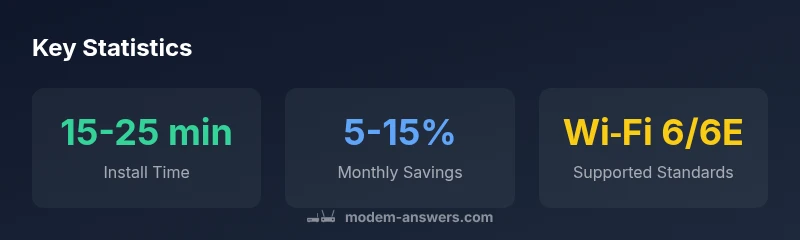
- Compare DOCSIS versions (3.1 recommended) and Wi‑Fi generations (Wi‑Fi 6/6E preferred).
- Confirm service tier compatibility and any provider‑specific features you need.
- Read user reviews focused on activation experience and firmware reliability.
- Verify warranty terms and return policies before purchasing. In my experience, following these steps saves time and reduces headaches—Modem Answers’s analysis confirms that sticking to Cox‑approved devices improves reliability and support outcomes.
Comparison of Cox-approved modems/routers
| Model Type | Max Speed (Mbps) | Notes |
|---|---|---|
| Cox-approved Gateway (DOCSIS 3.1) | 1000-2000 | Best for larger homes; check Cox tier |
| Cox-approved Gateway (DOCSIS 3.0) | 400-1000 | Older infrastructure; compatibility may vary |
| Bridge-mode capable gateway | N/A | Use when pairing with third‑party router |
FAQ
What does it mean for a modem router to be Cox-approved?
Cox-approved means the device has been tested and certified to work with Cox's network. Activation, support, and firmware updates are aligned with Cox's policies.
A Cox-approved device is certified to work with Cox, with official support and updates.
Can I use a non‑approved modem router with Cox service?
Non-approved devices may activate inconsistently or lack full support from Cox. If activation succeeds, features may be limited until a compatible model is used.
Non-approved devices can work sometimes, but you may miss features and support.
What’s the difference between a gateway and a bridge‑mode setup?
A gateway combines modem and router in one device. Bridge mode lets you use a separate router for advanced networking and easier upgrades.
Gateway is all-in-one; bridge mode lets you use your own router.
How do I verify Cox compatibility quickly?
Check Cox's official approved devices list for the exact model, confirm your service tier, and verify essential features like DOCSIS version and Wi‑Fi standard.
Look up the model on Cox’s approved devices list and confirm features.
Do Cox compatible devices get firmware updates automatically?
Many Cox-approved gateways receive automatic updates from the manufacturer or Cox. Keep automatic updates enabled to maintain security and performance.
Yes, many get automatic updates; keep it enabled.
“Reliability comes from using Cox-approved hardware paired with the right service tier. A compatible gateway reduces setup friction and future-proofs your home network.”
Key Takeaways
- Verify the model is on Cox's approved devices list.
- Choose DOCSIS 3.1 for future-proof speeds.
- Match the gateway to your service tier.
- Prefer a device with Wi‑Fi 6/6E for broader coverage.
- Modem Answers's verdict: prioritize Cox-approved devices to maximize reliability.