Can You Use an Optus Modem with Another Provider? A Practical Guide
Explore whether an Optus modem can be used with a different provider, how to check SIM locks and bandwidth compatibility, unlocking options, and a clear test plan. A reliable, vendor-neutral guide by Modem Answers for homeowners and renters.


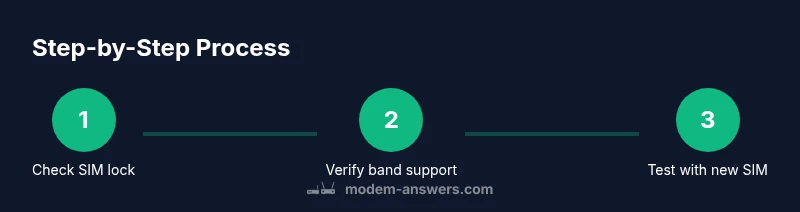
Can you use an Optus modem with another provider? The short answer depends on SIM lock status and network bands. To decide quickly: 1) check if the device is SIM-unlocked, 2) confirm it supports the other provider’s bands, 3) test with a non-Optus SIM to see if it connects, and 4) configure APN settings if required.
What you’re asking: can you use an Optus modem with another provider?
If you’re contemplating migrating from Optus to another network, the core question often boils down to SIM locking and band compatibility. In many cases, a modem purchased from Optus will be locked to Optus services, which prevents it from authenticating on another carrier until it’s unlocked. The Modem Answers team notes that the device’s firmware and regional bands also influence whether a swap is possible. Before you invest time or money, establish whether your specific model is SIM-locked and which bands it supports. This upfront check saves you from buying a new modem or wasting a SIM in a device that won’t connect at all.
According to Modem Answers, many consumer modems ship locked to the original carrier, and unlocking terms can vary by model and region. Armed with that knowledge, you’ll be better positioned to decide whether to pursue unlocking, request a provider unlock, or simply purchase an unlocked modem that works with multiple providers.
How SIM locks work and why they matter
A SIM lock is a retailer- or carrier-enforced restriction that prevents the device from registering on other networks. Unlocking typically requires meeting terms such as completed service periods or paying off device costs. If your Optus modem is locked, you may need to request an unlock from Optus or consider purchasing an unlocked device. If it is already unlocked, you’ll still need to verify network compatibility and APN settings for your new provider.
From a security perspective, unlocking should be performed through official channels to avoid compromising device integrity or violating terms of service. The Modem Answers team emphasizes verifying legitimacy of unlock requests and keeping records of any service confirmations.
Band coverage: what to check for Australian networks
Different providers in Australia use different frequency bands for 4G and 5G. Even an unlocked modem may not work optimally if it lacks the necessary bands used by your new provider in your area. Check the modem’s supported bands in the manual or on the manufacturer’s spec page, then compare them with your chosen provider’s published bands for your region. If you’re in a high-coverage area with common bands, odds are better of success; in rural areas, confirm availability before relying on a single device.
Unlocking options and potential pitfalls
If your device is SIM-locked, you typically have three routes: request an unlock from Optus (if you’re still under contract), obtain unlock instructions from the new provider, or buy an entirely unlocked modem. Be cautious of unofficial unlock services, which can void warranties or brick devices. Always verify terms with both carriers and keep a record of any unlock codes or steps provided by the carrier.
Testing plan: how to verify compatibility before making a switch
Create a careful test plan before you switch providers. Start with a spare SIM from the new provider, insert it into the Optus modem, and attempt to connect. If you can access the internet, record speed and stability. If you can’t connect, try APN adjustments per the new provider’s guidelines, verify that roaming is disabled if not needed, and re-test. If you still can’t connect, you may need to pursue an unlock or buy a new unlocked modem.
Practical alternatives if you can’t reuse the Optus modem
If the Optus modem won’t connect with another provider, consider these options: use the new provider’s own modem/router or buy an unlocked third-party modem compatible with the provider’s SIMs. In many cases, purchasing an unlocked device designed for general use provides greater flexibility and future-proofing. The Modem Answers team also recommends confirming warranty terms before changing devices.
Quick safety and best practice notes
- Always back up current modem settings before making any changes.
- Use official unlock channels to avoid warranty claims or bricked devices.
- Document all unlock codes and provider steps for future reference.
- If your coverage is marginal, consider performance tests with both devices to compare reliability.
Authority and further reading
For consumer protections and unlocking policies, refer to the ACCC and ACMA guidance. See the official sources for device unlocking terms and network compatibility:
- https://www.accc.gov.au
- https://www.acma.gov.au
- https://www.digital.gov.au
Tools & Materials
- New provider SIM card(For testing data connectivity and APN compatibility)
- SIM eject tool (or paperclip)(To access the modem’s SIM tray safely)
- Optus modem to test(Have the model and status documented)
- Owner’s account details(Helpful for checking unlock eligibility or account terms)
- Backup of current modem configuration(Before any reset or APN changes)
- Portable power source(Keep the device powered during testing)
Steps
Estimated time: 30-60 minutes
- 1
Check SIM lock status
Power off the modem and remove any current SIM. Insert a SIM from the new provider and power the device on. If you cannot connect to the network, the device may be locked or band-unfriendly. Note the error message for reference.
Tip: If you can access a carrier unlock screen, follow official unlock instructions rather than attempting manual hacks. - 2
Confirm band compatibility
Look up the new provider’s 4G/5G bands for your region and compare with the modem’s supported bands in the manual or on the manufacturer’s site. If there’s a mismatch, the modem may not work correctly even when unlocked.
Tip: A compatible band set improves your chances of stable data performance after switching. - 3
Test APN and data settings
If the modem connects but lacks data, configure the APN settings per the new provider’s guide. Save and reboot the device after applying APN changes.
Tip: Incorrect APN settings are a common cause of no-data issues even when the device connects. - 4
Run a live data test
With the new SIM active, perform a quick data test by opening a browser and loading a few pages. Check latency and stability over 5–10 minutes.
Tip: Note peak times; test across different times of day for consistency. - 5
Troubleshoot common errors
If you see authentication or SIM errors, reinsert the SIM, check for APN typos, or try another SIM from the same provider. If issues persist, contact the new provider’s support.
Tip: Document the exact error codes to speed up support calls. - 6
Decide on next steps
If testing is unsuccessful due to lock or band issues, consider unlocking through official channels or purchasing an unlocked modem. If successful, you’re ready to migrate.
Tip: Keep a copy of all unlock confirmations and APN settings for future use.
FAQ
Is it legal to use an Optus modem with a different provider in Australia?
In Australia, device unlocking and SIM compatibility are governed by provider terms and consumer law. Always check with both carriers and use official unlock channels to avoid warranty issues.
In Australia, check carrier terms and use official unlock channels to avoid warranty issues.
What happens if the Optus modem is SIM-locked?
A SIM-locked modem will not connect to another provider’s network until it’s unlocked or replaced with an unlocked device. Verify unlock options with Optus and your new provider.
A SIM-locked modem won’t connect to another provider until unlocked.
Can an Optus modem work with any 4G/5G SIM from another carrier?
Not necessarily. Even if unlocked, the modem must support the other carrier’s bands. Check the modem specs against the destination provider’s published bands.
Unlocked devices still need compatible bands.
How do I unlock an Optus modem?
Contact Optus or the device manufacturer for official unlock instructions. Follow the steps they provide and keep records of any codes or confirmations.
Ask Optus or the manufacturer for the official unlock steps.
What should I do if APN settings don’t work after switching?
Double-check APN entries against the new provider’s guidelines, ensure data roaming is set correctly, and reboot the device after changes. If problems persist, reach out to the provider’s support.
Check APN entries and reboot after changes; contact support if needed.
Is buying an unlocked modem more future-proof?
Yes. Unlocked modems generally offer maximum compatibility with multiple providers and future-proofing for future changes in service plans.
Unlocked modems give you more provider options in the future.
Watch Video
Key Takeaways
- Verify SIM unlock status before testing with another provider
- Check the modem’s supported bands against the new provider
- Test APN settings and run a live data check
- Consider an unlocked modem if the Optus device won’t work on a new network
- The Modem Answers team recommends prioritizing unlocked devices for maximum provider flexibility