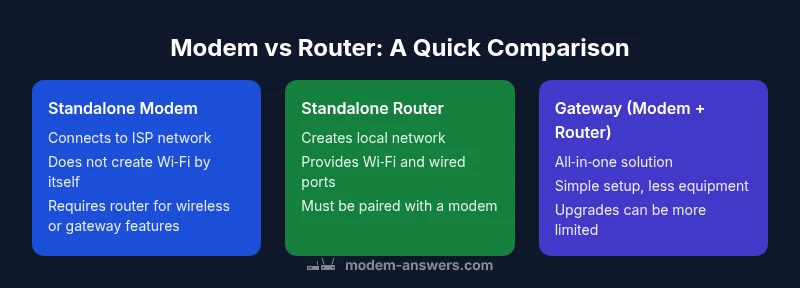
Is a Modem the Same as a WiFi Router? A Clear Comparison
Explore the differences between modems and WiFi routers, how they work together, and practical guidance for choosing the right home network setup.


The quick answer is no: a modem and a WiFi router are distinct devices with separate roles in a home network. A modem connects your home to your internet service provider and carries the wide area network to your location, while a router creates and manages your local network, distributing that internet signal via wired Ethernet and wireless Wi‑Fi. Understanding this difference helps determine whether you need standalone components or a gateway device.
The core question: is a modem the same as a wifi router?
In everyday conversations, people often conflate a modem with a Wi‑Fi router. The direct answer to the question is that they are not the same device, though they work together. A modem is the bridge between your home and the internet service provider, translating signals from cables, fiber, or satellite into a format your home network can use. A router, on the other hand, is responsible for creating a local network inside your home, assigning IP addresses, and directing traffic between devices. This distinction matters for coverage, speed, and future upgrades. According to Modem Answers, many households underestimate how much a single gateway device can constrain or enable performance depending on layout and device density. This article, drawing on Modem Answers Analysis, 2026, breaks down each device's job and offers practical setups for varied homes, from compact apartments to multi‑floor houses.
What a modem does
A modem is a network interface device that connects your home to the internet service provider. It handles the modulation and demodulation of signals over the provider’s infrastructure, whether coaxial cable, fiber, or DSL. In modern homes, modems often support DOCSIS standards for cable service or equivalent fiber interfaces. A standalone modem does not create a Wi‑Fi network by itself; it simply provides access to the internet. If you see a “gateway” label on a device from your ISP, that usually means the modem also includes routing functionality. The Modem Answers team notes that many people consider upgrading their Wi‑Fi first, but without a solid modem, you may reach a speed ceiling regardless of router quality. Keeping this in mind helps set realistic expectations for home networks and the role each device should play.
What a WiFi router does
A Wi‑Fi router establishes and manages the local network inside your home. It creates a wireless network, assigns local IP addresses, performs Network Address Translation (NAT), and routes traffic between devices and their internet gateway. Routers today also offer features like guest networks, parental controls, QoS (quality of service), MU‑MIMO, beamforming, and wired Ethernet ports for desktop devices. Even in a home with a modern modem, the router is the component that determines wireless coverage, network reliability, and the ability to support multiple devices simultaneously. The Modem Answers analysis emphasizes that the router choice largely drives user experience, especially in larger homes or busy households with many connected devices.
Key differences in features and performance
The most visible differences come down to purpose and performance envelope. A modem focuses on translating signals from the provider into a usable data stream and typically has no built‑in wireless technology. A router focuses on distributing that data to devices, managing traffic, and providing wireless connectivity. In terms of performance, the router usually determines Wi‑Fi coverage, support for multi‑device streaming, and the ability to run features like guest networks or VPNs. For households with higher device density or demanding workloads (4K streaming, video conferencing, gaming), investing in a capable router or a high‑quality gateway can have a larger impact on real‑world speeds than upgrading the modem alone. The distinction matters when planning future upgrades and is a frequent reason people ask, “is a modem the same as a wifi router”—the answer is that they are separate, complementary components.
How they work together in a home network
In most homes, the modem provides the entry point to the internet service and hands the connection to a router. The router creates the home network, assigns IP addresses, handles NAT, and routes traffic to devices via Ethernet or Wi‑Fi. If you have a separate modem and router, you can place the router in a central location for the best wireless coverage, and you can upgrade the router later as needs evolve without touching the modem. In some setups, a single device labeled a gateway combines both roles, which can simplify installation but may limit flexibility. When considering future-proofing, one may prefer separating the two devices to allow independent upgrades and optimized placement. This approach aligns with practical guidance from Modem Answers and is often easier to scale as your household adds more devices or requires more complex networking features.
Common configurations: standalone, gateway, bridge mode
There are three common configurations. First, the most traditional approach uses separate modem and router: your ISP connects to the modem, which then connects to your router. This setup offers maximum flexibility and makes it easy to upgrade either device. Second, the gateway configuration combines modem and routing functions in one box from the provider; this is simple to set up and manage, but can limit upgrade options. Third, bridge mode lets you connect a standalone router to a provider’s gatekeeper, effectively turning off the gateway’s routing features in the device and giving the whole network to your own router. Each configuration has tradeoffs in cost, complexity, coverage, and performance, so assess your home layout and usage patterns before deciding which path to take. The Modem Answers team suggests starting with a standalone modem plus router in most situations for optimal flexibility.
Practical guidelines for choosing your setup
To decide whether you should separate modem and router or buy a gateway, start with your home layout, internet speed, and device count. If you live in a larger residence or have many devices, lean toward a strong router (or a gateway with robust Wi‑Fi) placed centrally for even coverage. If your internet plan includes high speeds, ensure the router can handle the throughput and features you want (multi‑user support, security features, and ease of management). If you’re price‑sensitive, compare the total cost of renting equipment from the provider with buying a compatible modem and a capable router. Consider future needs like smart home devices or work‑from‑home setups and remember that you can often upgrade one component at a time. The Modem Answers analysis reiterates that the right configuration depends on your space, budget, and goals, not just the latest marketing claim.
Myths vs reality in consumer setups
A common myth is that you must buy the most expensive router to get great coverage; reality varies by floor plan and device density. Another misconception is that a gateway is always the simplest option; in larger homes, separating devices can yield better coverage and easier troubleshooting. Some users think a higher Wi‑Fi standard guarantees flawless performance; while newer standards improve efficiency, real-world results depend on placement, interference, and the number of connected devices. The truth is nuanced: sometimes a modest router with thoughtful placement beats a top‑tier model placed poorly. By focusing on coverage, device count, and realistic throughput needs, you can select a configuration that delivers reliable performance without overspending.
Quick checks to verify your current setup
If you’re unsure whether you’re running a modem plus router or a gateway, start by checking the device that connects to your coaxial/fiber/phone line. If it has a built‑in Wi‑Fi radio and a built‑in routing interface, you’re likely using a gateway. If you have two devices, one connected to the other with an Ethernet cable and each with separate ports and interfaces, you’re likely using a standalone modem and router. Log in to the router’s web interface to check if there is a separate modem management page available; if so, you probably have two devices. Finally, perform a speed test from a wired device and compare results with the plan to verify there are no bottlenecks caused by a weak router, not the modem.
The bottom line: turning knowledge into action
The practical takeaway for most households is to separate the modem and router whenever possible. This approach provides flexibility to upgrade the router for better Wi‑Fi coverage as your needs grow, without replacing the modem when your internet speed changes. If you choose an all‑in‑one gateway, ensure it supports your speed tier and offers features you’ll actually use (secure guest networks, parental controls, etc.). Remember that your home network’s performance is a function of device capability, placement, and configuration, not just the presence of new hardware. By understanding that is a modem the same as a wifi router is not accurate, you can design a network that scales with your home and lifestyle.
Feature Comparison
| Feature | Standalone Modem | Standalone Router | Gateway (Modem + Router) |
|---|---|---|---|
| Role in network | Brings internet signal from provider to home | Creates and manages home network, distributes Wi‑Fi | All‑in‑one device: modem + router in one box |
| Wi‑Fi coverage | Depends on external router or separate access points | Built‑in Wi‑Fi with capabilities depending on router quality | Integrated coverage; typically relies on internal design |
| Upgrade path | Upgrade modem separately if needed | Upgrade router separately for better wireless performance | Upgrade is one device; may limit customization |
| Number of devices supported | Limited by modem capabilities; networking features limited | Performance scales with router quality and features | Balanced for small to medium homes; higher device counts depend on router |
| Cost considerations | Often lower upfront when renting modem only | Potentially higher upfront for a strong router plus modem | Simplicity can reduce upfront costs but limit future expansion |
| Best for | Registered for ISP‑provided service with basic needs | Homes needing strong Wi‑Fi and flexible upgrade path | Smaller homes or setups favoring simplicity |
Positives
- Flexibility to upgrade components on your schedule
- Better Wi‑Fi coverage with a dedicated router
- Easier troubleshooting with separate devices
- Center placement improves performance in larger homes
- Can be more cost-effective in the long run if you upgrade selectively
What's Bad
- Higher upfront cost for two devices
- More cables and space required
- More complex setup and maintenance for non‑tech users
- ISP rental could be avoided only by purchasing hardware upfront
Standalone modem + router generally offers the best balance of performance and flexibility
For most households, separating the modem and router provides easier upgrades, better coverage, and clearer troubleshooting. A gateway can be simpler, but it may limit future customization. The Modem Answers team recommends starting with separate devices if you want scalability and long‑term value.
FAQ
Is a modem enough to provide Wi‑Fi in a home network?
No. A modem alone does not create a wireless network. You typically need a router (or a gateway) to provide Wi‑Fi and manage local network traffic.
No—modems alone usually don’t create Wi‑Fi. You’ll need a router or a gateway to get wireless coverage.
Can I use my own router with my ISP’s modem?
Yes. In many setups you can use your own router with the ISP’s modem, often by putting the modem in bridge mode or using a gateway’s routing features. This gives you more control over Wi‑Fi and features.
Yes. You can usually pair your own router with your ISP’s modem, sometimes by enabling bridge mode.
What is a gateway in home networking?
A gateway combines modem and router functions in a single device. It provides internet access and manages your local network in one box, which can simplify setup but may limit upgrade flexibility.
A gateway is a single box that acts as both modem and router, simplifying setup but sometimes limiting upgrades.
Should I rent equipment from my ISP or buy my own?
Renting from your ISP is convenient but can be more expensive over time. Buying your own compatible modem and router can be cheaper in the long run and offers greater control.
Renting is easy, but buying your own modem and router often saves money long term and gives you more control.
Does a router affect internet speeds?
A router can affect throughput and perceived speeds, especially with many devices, interference, or weak placement. The modem and the internet plan set the ceiling, but a capable router helps you reach that ceiling more reliably.
Yes. A good router helps you reach your internet plan's speeds, especially in busy homes.
What setup is best for a large home?
In a large home, a separate modem and high‑quality router (placed centrally, possibly with mesh nodes) usually delivers the most reliable coverage and speeds. A gateway can work, but expansion and placement are more flexible with separate devices.
For a large home, separate modem and router with good placement, or a mesh setup, is typically best.
Key Takeaways
- Identify the distinct roles of modem and router
- Choose a setup that matches home size and device count
- Prioritize placement to maximize Wi‑Fi coverage
- Evaluate future needs before buying equipment
- Consider bridging or gateway options based on simplicity vs. flexibility