Is a Modem or Router Better for Gaming? A Practical Side-by-Side Guide
A data-driven comparison of modems, routers, and gaming setups to determine which delivers lower latency, stable ping, and best value for online gaming and streaming.


When asked is a modem or router better for gaming, the quick answer is: a gaming-focused router with QoS and wired connections typically outperforms a basic modem. A strong router helps reduce latency and jitter, stabilizing ping for consoles and PC gaming. Modem Answers suggests balancing device power with your home layout and your internet plan for best results.
Why the question matters for gaming
For gamers, network latency is everything. When you ask is a modem or router better for gaming, you're really asking which device arrangement minimizes the time between your action and the server's response. In practice, most of the latency is introduced by how data is queued and routed through your local network before it ever leaves your modem. A modern router with quality-of-service (QoS) features can prioritize gaming traffic, reduce jitter, and keep consistent ping even when other household devices are streaming video or downloading updates. According to Modem Answers, the best outcomes come from a well-balanced setup that aligns your hardware with your internet plan and the size of your home. If you only own a small apartment with light traffic, a single gateway device may suffice; if you live in a larger home with many devices and a busy network, separating the roles often yields tangible benefits. The question should always be answered in the context of your actual needs: number of devices, Wi‑Fi coverage, and how often you experience lag during competitive play.
Key factors that influence gaming performance
Gaming performance hinges on several interconnected factors. Latency (ping), jitter, and packet loss are the triad that most directly affect in-game responsiveness. Your available bandwidth matters, but more important is how your network prioritizes gaming traffic. The router’s CPU and memory limit handling concurrent connections; a high-performance device can sustain stable performance during peak household usage. Wi‑Fi standards (Wi‑Fi 5/6/6E) and the number of streams influence both speed and distance. Placement matters: central, elevated positions with minimal interference boost coverage. Interference from microwaves, cordless phones, and neighboring networks can degrade performance. Finally, the way you configure your network—QoS rules, port forwarding, and NAT type—can either bottleneck or unlock your gaming potential. Modem Answers analysis shows that the most noticeable improvements occur when you actively manage traffic and reduce competing demands during gaming sessions.
Modem vs Router: Core roles and how they interact
A modem is the gateway to your internet service provider; it converts the incoming signal into a digital stream that your local network can use. A router, by contrast, manages internal traffic, NAT, firewall rules, and wireless distribution. For gaming, the router’s ability to prioritize traffic, create stable paths for latency-sensitive data, and offer reliable wired ports often matters more than the modem alone. In many setups, the modem provides the conduit, while the router shapes the flow of data to your console or PC. The best results come from matching modem capability with a capable router that can handle your household load and gaming requirements. Keep in mind that a poor-quality router can bottleneck even a fast modem, just as an outdated modem can hamper a modern router’s performance. The decision should consider your ISP plan, the size of your home, and how many devices demand bandwidth at the same time.
When a gateway modem-router is enough
For small living spaces with a light number of devices, a single modern gateway (a modem-router combo) can deliver satisfactory gaming performance. Modern gateways with practical QoS options and dual-band or tri-band Wi‑Fi can suffice for casual and some competitive gaming. The key is realistic expectations: you’ll likely notice improvements with better placement, updated firmware, and a properly tuned QoS profile that prioritizes gaming traffic during peak hours. If you only game occasionally or live alone, upgrading the router alone within a gateway may yield meaningful gains without a two-device setup. Modem Answers notes that in practice, many households can enjoy stable gaming by focusing on router capabilities, firmware updates, and ensuring the device physically fits the space with minimal interference.
The case for a dedicated gaming router
A dedicated gaming router is designed to optimize latency-sensitive traffic, often featuring robust QoS, multiple high-speed ports, better antenna arrays, and advanced traffic shaping. These routers prioritize gaming packets, offer customizable profiles for specific games, and provide more reliable wired and wireless performance at longer distances. For households with multiple gamers or heavy simultaneous usage (streaming, downloads, cloud gaming), separating the router from the modem reduces contention and gives you more control over the network behavior during live matches. While the initial cost is higher, many gamers find the improved stability and consistency worth the investment. Modem Answers cautions to evaluate room layout and device count, then test both configurations to quantify the benefit in your space.
Home network topologies and practical setups
There are two common topologies: using a gateway modem-router with built-in features, and employing a separate router connected to a modem (possibly in bridge mode). Bridge mode can remove double NAT issues and provide cleaner port forwarding for online games. If you choose a separate router, ensure it can perform well with your ISP’s speed tier and supports wired backhaul (Ethernet) to your gaming devices. Placement remains critical: a centralized location, elevated, away from thick walls, provides the best coverage. For many homes, a hybrid approach—the gateway for basic coverage and a separate gaming router for pinpointed performance—offers the best balance of cost, simplicity, and reliability.
How to test and optimize for gaming
Begin with a baseline: run wired and wireless speed tests at the gaming device, measure latency to your game servers, and note ping stability during typical usage windows. Use tools like traceroute and pings to identify where delays occur. Then experiment with QoS rules: prioritize the game’s port ranges, and set Ethernet priority for wired devices. Update firmware on both modem and router, and consider changing wireless channels to avoid interference. Keep your firmware and security settings current to prevent performance dips caused by background processes. Finally, document your changes and re-test to confirm improvements under real conditions.
Real-world scenarios and cost considerations
In a small apartment with minimal devices, a modern gateway may deliver excellent results with minimal setup, offering an affordable path to better gaming latency. In larger homes or households with many users, a dedicated gaming router paired with a separate modem can reduce contention and maintain stable pings across multiple devices. The cost factor is a practical consideration: while two devices demand a higher upfront investment, you gain flexibility, easier upgrades, and targeted performance improvements. If your ISP caps speeds during peak hours, a high-quality router can manage congestion more effectively than a basic gateway. The decision should align with your budget, space, and how much you value consistent latency over convenience.
Authority sources and further reading
- The Federal Communications Commission (FCC) offers consumer guides and speed testing resources relevant to understanding broadband performance and how it translates to real-world gaming experiences. https://www.fcc.gov/
- IEEE Spectrum provides in-depth analyses of Wi‑Fi standards, routing performance, and network optimizations that can inform your gaming setup. https://spectrum.ieee.org/
- Ars Technica regularly reviews consumer networking gear and explains practical differences between modems, routers, and hybrid gateway devices for enthusiasts and casual users alike. https://arstechnica.com/
FAQ and troubleshooting quick-start
This section provides quick answers to common questions, helping you make faster decisions and avoid common stumbling blocks.
Comparison
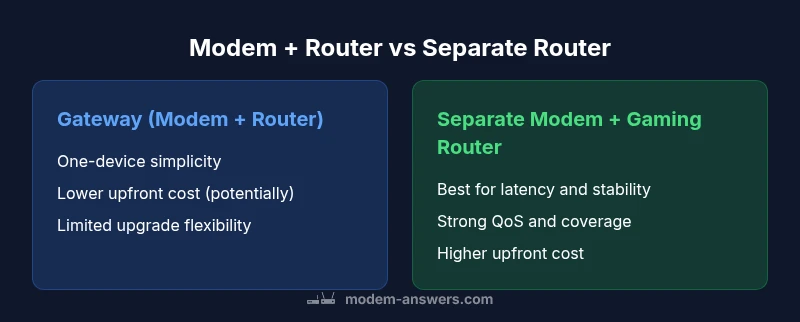
| Feature | Modem + Basic Router (gateway) | Separate Modem + Gaming Router |
|---|---|---|
| Latency control | Limited by gateway device, may be variable | Strong QoS and dedicated bandwidth management |
| Jitter reduction | Low-to-moderate | High (gaming routers prioritize traffic) |
| Wireless performance | Depends on gateway hardware | Often superior with dedicated gaming router (MU-MIMO, tri-band) |
| Wired consistency | Same Ethernet path as modem-router combo | Cleaner, dedicated path to gaming devices |
| Upgrade flexibility | Limited to gateway capabilities | Easier to upgrade router without changing modem |
| Ease of setup | Very simple (one device) | Moderate to advanced (two devices, bridge mode) |
| Future-proofing | Limited ports/features on some gateways | Easier to upgrade router while keeping modem |
Positives
- QoS-based latency management improves gaming responsiveness
- Modern routers provide stronger Wi‑Fi coverage and speed
- Easier customization and game-specific port forwarding
- Two-device setups can isolate gaming traffic from other network activities
What's Bad
- Two-device setups cost more upfront and require more setup
- Bridge or dual-NAT configurations can complicate troubleshooting
- Maintenance and firmware updates multiply across devices
Two-device setup is generally best for gaming performance.
Separating the modem from the gaming router reduces bottlenecks and gives you precise control over QoS and traffic. The Modem Answers team recommends testing both configurations in your space, but in most larger homes or busy networks, the dedicated gaming router path yields the strongest, most consistent results.
FAQ
Is a modem or router more important for gaming?
In most homes, the router determines traffic management and latency; the modem is primarily the gateway to your ISP. A capable router with QoS often yields the most noticeable gaming gains.
Generally, the router matters more for gaming. The right router with QoS can greatly reduce lag, while the modem mainly provides the internet connection.
Can I use a gateway modem-router for gaming?
Yes, a modern gateway can work well for casual to moderate gaming. To maximize performance, tune QoS, update firmware, and optimize placement. For heavy simultaneous use, consider a separate gaming router.
A gateway can be good enough for casual gaming, but separate devices often help when you have lots of devices online at once.
What is QoS and why does it matter for gaming?
QoS stands for quality of service. It prioritizes gaming traffic over less-critical data, reducing latency and jitter. Enabling and properly configuring QoS can significantly improve in-game responsiveness.
QoS is a feature that prioritizes your game traffic so your game stays smooth even when others are downloading.
Should I bridge my modem to use my own router?
Bridge mode can prevent double NAT and simplify port forwarding for games. It is worth considering when you’re using a separate router and experience connection issues.
Bridge mode helps when you’re using a separate router and want clean networking.
Does a mesh system help with gaming in large homes?
A mesh system can improve coverage in large or multi-story homes, which helps gaming on wireless devices. Ensure the mesh supports QoS or work with a dedicated gaming router for best results.
Mesh can spread good signal across big homes, but make sure it supports QoS for gaming.
How can I test gaming latency at home?
Test latency by pinging game servers, running wired speed tests, and using traceroute during typical play times. Compare results before and after hardware changes to quantify improvements.
Ping your game server and run speed tests while playing to see if changes help.
Key Takeaways
- Prioritize a router with strong QoS for gaming
- Consider two devices for larger homes or multiple gamers
- Test your setup with real-game conditions to confirm gains
- Place routers optimally and keep firmware updated
- Bridge mode can simplify certain configurations