Different Modem and Router: A Comprehensive Guide
This detailed comparison explains how different modem and router configurations affect speed, reliability, security, and setup across homes and apartments.


According to Modem Answers, most households start with a dedicated modem and router (or a modem-router combo) and tailor it to their provider, speed tier, and desired features. The quickest path is to identify compatibility, map your usage, and then pick a system type that fits your home. In short, evaluate your needs for coverage, security, and future upgrades before committing.
What 'different modem and router' means for your home network
In everyday conversations, people refer to 'modem' and 'router' interchangeably, but a thorough look reveals distinct roles in a home network. A modem is the bridge to your internet service provider; a router builds and manages the local network, assigns devices IP addresses, and routes traffic. When you encounter the phrase 'different modem and router', you're looking at setups where these devices are separate rather than combined in a single box. Understanding this separation helps you tailor performance, coverage, and security to your space. For homeowners and renters evaluating options, the distinction matters because it directly affects upgrade paths, troubleshooting, and your provider's compatibility requirements. The Modem Answers team emphasizes clarity here: know what each device does before you buy, and align your choices with your home's size and device load. In many homes, users notice improved reliability by separating duties: the modem handles the external connection reliably, while the router optimizes internal traffic management and wireless coverage. If you currently have a single gateway from your ISP, you may be able to upgrade in smart steps without overhauling your entire network. The takeaway is simple: separate devices give you flexibility, while a single gateway offers minimal setup hurdles.
Why the distinction matters in real-world setups
The practical impact of having or not having separate devices shows up in coverage, stability, and upgrade flexibility. When the modem and router are separate, you can swap one component without touching the other. This modularity matters for homes with thick walls, multi-story layouts, or a high device count. A separate router can be relocated to maximize signal reach, while a modern modem stays near the service entry to maintain a stable upstream connection. For renters, the modular approach can reduce long-term costs by allowing a later router upgrade when the budget allows, rather than replacing the entire gateway. For homeowners, the ability to run a dedicated high-performance router in a central location can improve wireless performance across bedrooms, home offices, and outdoor spaces. In addition, separate devices enable more granular privacy and security controls since you can update firmware for each device on staggered schedules. The Modem Answers analysis indicates that households that optimize the roles of each device tend to experience fewer dropped connections and clearer video calls, even when the internet plan remains the same. This is a practical starting point for anyone deciding between 'modem + router' versus 'modem-router combo'.
Configurations: separate devices vs combo devices
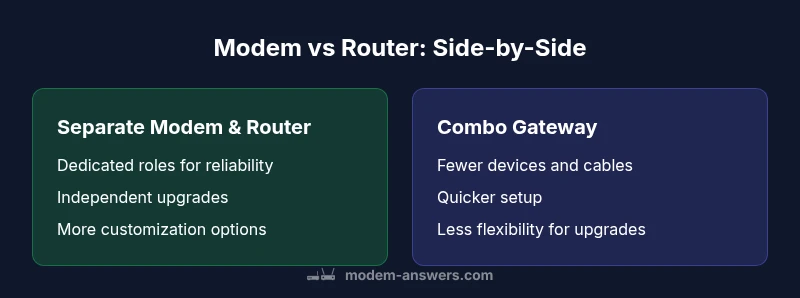
Three primary configurations shape most homes: (A) separate modem and router, (B) a modem-router combo device, and (C) gateway systems with built‑in mesh nodes. The two most common options are (A) and (B). Each path has implications for performance, ease of setup, and long‑term growth. In the separate‑devices scenario, you gain maximum control: you can pick a high‑performance router to suit streaming, gaming, or smart home needs, and you can replace either component as technology evolves. The combination option emphasizes convenience and a compact footprint, often reducing upfront clutter and simplifying service setup. However, it comes with tradeoffs: you rely on a single device for both connectivity and wireless distribution, which can constrain upgrades and limit advanced features. For households with variable usage, hybrid approaches exist, such as using a dedicated router with your ISP’s gateway configured in bridge mode. The key is to map your household priorities—coverage, speed, ease of maintenance, and budget—and test a plan for gradual upgrades. The Modem Answers framework suggests starting with a clear model of your current pain points: dead zones, streaming lags, or frequent resets, then choosing the architecture that minimizes those issues while keeping future expansion feasible.
Key features that matter for stability and growth
When evaluating 'different modem and router' configurations, focus on features with real impact on day‑to‑day performance. Coverage quality depends on antenna design, beamforming, and the router’s hardware; a strong processor helps handle multiple devices without slowdowns. Look for dual‑band or tri‑band operation and the ability to assign devices to different bands for efficiency. A robust security suite matters, including automatic firmware updates, a built‑in firewall, and guest network support to isolate IoT devices. Management interface usability is another practical factor: a clear dashboard, straightforward parental controls, and easy port forwarding save time. Consider future growth: if you plan to add more smart devices, cameras, or a home office setup, ensure the router can handle more simultaneous connections and firmware updates without reconfiguring. Environmental considerations also matter: if you have a large living space, you may need a high‑powered router with additional access points or a mesh system in a later phase. In all cases, verify that your chosen devices are compatible with your internet plan and service provider. The Modem Answers team recommends documenting your must‑have features before shopping to avoid feature‑gaps at installation.
Comparison
| Feature | Separate Modem + Router | Modem-Router Combo |
|---|---|---|
| Ease of setup | Moderate; two devices require initial configuration | Simple; single device setup |
| Upgrade flexibility | High; upgrade router or modem independently | Low; upgrades affect whole unit |
| Coverage and throughput | Potentially wider coverage with a capable router | Typically adequate but limited by single device |
| Troubleshooting and fault isolation | Easier to isolate faults to modem or router | Fault affects routing and connection together |
| Provider compatibility | Often more flexible; mix-and-match allowed | Often provider-limited to gateway bundles |
| Cost and footprint | Higher upfront cost and more hardware | Lower upfront cost and smaller footprint |
Positives
- Flexible upgrades and long-term scalability
- Easier troubleshooting with isolated components
- Better performance options for large households
- More customization for advanced users
What's Bad
- Higher upfront cost and more cables
- Takes time to set up and manage two devices
- Requires some networking knowledge for optimal results
Modular setups (separate modem + router) generally offer the best balance of performance, upgradeability, and fault isolation for larger homes; combo devices win on simplicity for small spaces.
If you have a larger home or a busy network with multiple devices, a modular approach provides flexibility and future-proofing. For compact living spaces and straightforward setups, a modem-router combo reduces clutter and speeds up installation.
FAQ
What is the fundamental difference between a modem and a router?
A modem connects your home network to the internet via your ISP, converting external signals into a usable data stream. A router creates the local network and directs traffic between devices, enabling Wi‑Fi and wired connections.
A modem connects you to the internet; a router shares that connection with your devices.
Is a modem-router combo suitable for every home?
Combo devices are convenient for small spaces and simple setups, but they offer less flexibility for upgrades and higher-end performance. If you expect growth or want maximum control, a separate modem and router is preferable.
A combo box is easy, but you give up upgrade options and precise control.
Can I upgrade my network without replacing the modem?
Yes, you can upgrade your router while keeping your existing modem, provided it remains compatible with your plan. Confirm the modem supports your speed tier and that there are no provider restrictions.
You can usually upgrade the router without touching the modem, as long as the modem still works with your plan.
What should I look for in a router for streaming and gaming?
Choose a router with strong coverage, reliable wireless performance, and QoS features to prioritize gaming and video traffic. Look for newer wireless standards and ample processing power to handle multiple devices.
Pick a router with good coverage, smart traffic management, and enough capacity for several devices.
Do I need to bridge a modem and router?
Bridging disables the gateway’s routing features so a separate router handles routing. It’s useful for advanced setups but adds setup steps and potential pitfalls.
Bridge mode lets your own router take over; it can improve control but needs careful setup.
Are there security risks with mesh networks or multiple devices?
Security depends on updates and password hygiene. Mesh systems simplify coverage but require regular firmware updates and consistent encryption across nodes.
Mesh can be secure if you keep updates current and use strong passwords.
Key Takeaways
- Assess space and device load before buying
- Modem-router combos excel in small spaces
- Separate devices suit larger homes and advanced users
- Check provider compatibility before purchase
- Prioritize security and firmware update plans