ARRIS vs NETGEAR Modems: A Practical Comparison for Home Networks
A data-driven, practical comparison of arris vs netgear modem options to help homeowners pick based on compatibility, features, and value. Learn which choice fits your home network.


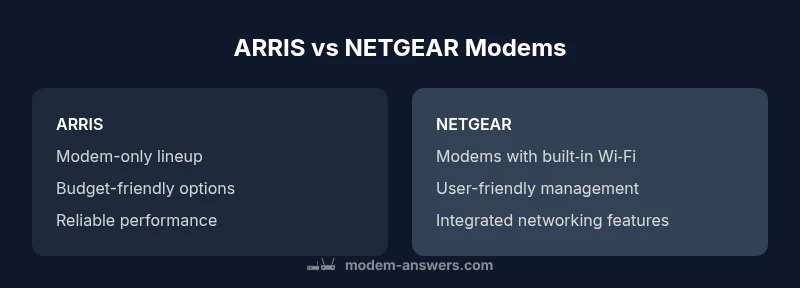
When evaluating arris vs netgear modem options, most homes can rely on solid, standards-based performance from either brand. ARRIS typically offers budget-friendly, reliable standalone modems, while NETGEAR often provides modem-router combos with user-friendly networking features. The key is to verify ISP compatibility, confirm the required DOCSIS standard, and decide whether you want a separate router or an all‑in‑one device. This quick comparison helps you decide where to start.
ARRIS vs NETGEAR: Framing the Debate
In the world of home networking, the choice between ARRIS and NETGEAR modems is one of practicality and value rather than hype. Homeowners often ask whether the brand matters for their ISP and whether they should prioritize a standalone modem or a modem-router bundle. The reality is that both brands offer solid, standards-based devices that can support typical broadband plans. The decision usually comes down to how you want to design your home network—whether you prefer a clean, dedicated modem or a more integrated experience with Wi‑Fi built in. For many households, the right pick hinges on compatibility with their internet service provider, the DOCSIS standard their plan requires, and the feature set they truly need. This section sets the stage for a methodical comparison so you can approach the decision with a clear framework.
As you read, keep in mind the goal of Modem Answers: to translate technical specs into practical guidance for homeowners. By focusing on real-world use, you’ll avoid chasing minor spec differences that have little impact on day-to-day performance. The arris vs netgear modem conversation is less about brand loyalty and more about aligning product capabilities with your home network goals.
Key Criteria for Choosing Between ARRIS and NETGEAR Modems
Selecting between ARRIS and NETGEAR modems should start with concrete criteria that map to your real-life needs. The most impactful factors include compatibility with your ISP, the intended network topology (modem-only vs modem-router), the presence of built‑in Wi‑Fi, and the long-term costs associated with ownership versus rental. You’ll also want to consider how easy it is to activate the device, update its firmware, and maintain security over time. According to Modem Answers, the first question homeowners should ask is: which devices are certified by my ISP and supported for activation on my plan?
Beyond compatibility, consider how you plan to use your home network. If you want a compact, budget-friendly modem that competes well on speed and reliability, ARRIS often offers strong options that are straightforward to set up. If you prefer an all-in-one experience with a built-in router and a more guided setup, NETGEAR’s lineup frequently emphasizes user-friendly features and simplified management through an app. Price, warranty terms, and retailer support are also practical differentiators that influence the total cost of ownership over several years.
Another important factor is future-proofing. Look for DOCSIS 3.1 support if you’re on a gigabit plan or anticipate higher speeds in the coming years. While both brands may offer devices that support this standard, ensure that the specific model you choose has the capabilities your ISP requires. In the end, the best choice balances your budget with the features that genuinely improve your daily experience, rather than chasing the latest buzzword.
Compatibility and Activation: How to Verify Before You Buy
To prevent post-purchase headaches, the verification step is where most households gain clarity. The quick approach is to pull your current ISP’s approved device list and cross-check the exact ARRIS or NETGEAR model you’re considering. If you’re unsure about model numbers, use the device’s chipset and DOCSIS version as a proxy for compatibility. ISPs typically support equipment when the model appears on their approved list and the activation process completes without errors.
Modem activation generally requires a few steps: connect the coaxial cable, power the device, and run the self-activation procedure through your ISP’s portal or customer service. If activation fails, consult the ISP’s compatibility page to confirm the model is still supported, and verify that you’re using the correct firmware version and plan tier. In some regions, the service provider may require the device to be provisioned through their own portal, which can be a quick process when the device is pre-approved. The outcome is simple: a smooth activation leads to reliable performance and predictable speeds across your home network.
questions_placeholder_3
Design Philosophies: Modem-Only Devices vs Modem-Router Combos
A core design distinction between ARRIS and NETGEAR often boils down to modem-only devices versus modem-router hybrids. ARRIS frequently emphasizes reliable, compact modems that excel as stand-alone units when paired with your preferred router. This makes ARRIS an attractive choice for hobbyists and households that want to curate their own high‑performance networking gear or favor minimal hardware in the living space.
NETGEAR, on the other hand, has cultivated a larger lineup of modem-router combinations and devices with built‑in Wi‑Fi, app control, and easy guest networks. For many users, a NETGEAR modem-router combo can simplify setup and reduce device clutter. The potential downside is less flexibility when you want to swap routers or if you need a bespoke mesh system that relies on a different approach to wireless coverage. Whichever path you choose, confirm that the device supports the number of devices you expect to connect and the coverage you require in your home.
In practice,Modem Answers emphasizes that the best decision is the one that aligns with how you use your home network, not just how fast a modem claims to be.
Firmware, Security, and Updates: Keeping Your Network Protected
Firmware and security updates are critical for long‑term reliability. ARRIS devices tend to be straightforward, with updates typically managed by the ISP or the manufacturer, depending on whether the device is rented or owned outright. NETGEAR devices often offer more consumer-facing update mechanisms, sometimes through companion apps, which can be convenient but occasionally introduce version fragmentation across models.
Regardless of brand, you should routinely check for firmware updates, enable automatic security features if available, and monitor for any advisories from your ISP or the manufacturer. A simple best practice is to set a reminder every six to twelve months to verify the latest firmware and to review security settings, firewall options, and default passwords. This proactive approach minimizes vulnerability windows and helps ensure your home network remains robust over time.
Price, Value, and Longevity: How to Time Your Purchase
Price considerations often drive the initial decision, but long‑term value matters more for most homeowners. ARRIS generally offers models with compelling price-to-performance ratios, making it a sensible pick for budget-conscious buyers who want solid reliability without premium features. NETGEAR devices—especially those with built‑in Wi‑Fi or premium management features—tend to command higher upfront prices but can deliver convenience and integrated network management that saves time.
When evaluating value, consider the total cost of ownership: purchase price, potential rental costs avoided, and the expected lifespan of the device. Warranty length and the availability of replacement parts or firmware updates over the device’s lifetime affect this calculation. Modem Answers analysis shows that choosing a device with longer software support and accessible customer support often pays off in the long run, even if the upfront cost is modestly higher.
Real-World Scenarios: Which Brand Fits Your Home Setup
If your priority is a simple, budget-friendly setup with dependable performance for standard plans, ARRIS often hits the sweet spot for many households. On the other hand, if you value convenience and a turnkey networking solution with built‑in Wi‑Fi and a friendly app interface, NETGEAR can offer the smoother path to a functional home network.
For households planning to grow into a mesh Wi‑Fi system or wanting tighter control over guest networks and parental controls, the NETGEAR approach may pay dividends. If you require a premium, high‑throughput modem for future upgrades or a plan with gigabit speeds that push 2 Gbps in the future, ensure the model you pick supports DOCSIS 3.1 and can keep pace with evolving ISP offerings. The bottom line is: map your usage patterns—device count, streaming needs, and gaming latency—to the features most likely to benefit your household.
Setup, Activation, and Common Pitfalls
To minimize setup friction, prepare a simple checklist before you buy: verify ISP compatibility, confirm the DOCSIS version, decide between modem-only or modem-router, and identify the expected coverage area in your home. Once you have the device, follow the official activation steps provided by your ISP and the manufacturer to ensure a smooth start. Common pitfalls include attempting to activate an incompatible model, using an old firmware version, or placing the modem in a location with poor signal propagation.
Pro tips include placing the device in a central location away from walls and metal appliances, using a separate router if you need advanced features, and testing speeds with a wired connection during initial testing. With careful setup, ARRIS and NETGEAR devices can deliver reliable performance for most households without gimmicks or hype.
Scoring Framework: How to Pick Quickly and Reading List
If you want a quick framework for deciding between arris vs netgear modem options, rate each category: compatibility, device type (modem-only vs modem-router), price, and future-proofing. Give higher weight to compatibility and future-proofing, then balance with your budget. For deeper study, consult official ISP compatibility pages and user reviews that reflect real-world experiences in your region. For readers seeking additional context, a set of authoritative sources provides background on standards, security considerations, and market trends. This framework helps you make an informed, repeatable decision rather than a one-off guess.
Comparison
| Feature | ARRIS modem | NETGEAR modem |
|---|---|---|
| Typical product focus | Modem-only options common | Modem-router combos or integrated Wi‑Fi common |
| Wi‑Fi integration | Usually separate router | Often includes built-in Wi‑Fi (combo models) |
| ISP compatibility breadth | Broad support across major ISPs | Broad support varies by model but generally strong |
| Price tier | Budget to mid-range | Mid-range to premium depending on model |
| Firmware updates | ISP-driven or manufacturer updates | Vendor app-driven updates and more user control |
| Warranty & support | Standard warranty and retailer support | Warranty terms depend on model and retailer |
Positives
- Extensive model variety across budgets and needs
- Wide retailer and retailer availability for easy purchase
- Solid reliability for everyday home networks
- Strong warranty options and customer support channels
What's Bad
- Firmware updates can be inconsistent across models and regions
- Some models require a separate router for best performance
- Support experiences vary by region and channel
ARRIS is typically best for budget-conscious buyers seeking reliable, standalone modems; NETGEAR shines when you want an all-in-one solution with built‑in Wi‑Fi and user-friendly management.
If you want a straightforward modem without extra network features, ARRIS often delivers good value. If ease of setup and integrated networking matter more, NETGEAR is the stronger option. Always verify ISP compatibility and future-proofing before you buy.
FAQ
What are the main differences between ARRIS and NETGEAR modems?
The core differences lie in product focus and feature sets. ARRIS emphasizes reliable, budget-friendly modem options, often used with an external router. NETGEAR frequently offers modem-router combos with built‑in Wi‑Fi and consumer-friendly management apps. Both brands support common DOCSIS standards, but model-by-model compatibility should be checked against your ISP.
ARRIS focuses on solid modems at good prices, while NETGEAR leans toward easy-to-use, all-in-one devices. Always check your ISP’s approved lists before buying.
Are ARRIS and NETGEAR modems compatible with major ISPs?
In general, both brands are compatible with major ISPs, but specific models must be approved for activation on your plan. Always consult your ISP’s compatibility page and confirm the exact model number before purchasing. This reduces the risk of activation delays or service limitations.
Yes, but double-check the exact model on your ISP’s list before you buy.
Should I buy or rent a modem?
Buying saves ongoing rental fees over time and provides full ownership, but requires upfront cost and responsibility for updates. Renting can simplify support and upgrades through your provider but adds ongoing costs. Assess your commitment length, budget, and how important control over firmware and settings is to you.
Buying usually saves money long-term; renting can be simpler if you don’t want to manage updates.
Do modem-router combos from NETGEAR have downsides?
Modem-router combos offer convenience but can limit flexibility if you later want to upgrade the router or create a multi-device mesh. They may also have fewer customization options compared with separate devices. If you anticipate needing a high‑end router or future mesh expansion, consider a separate router.
Combo devices are easy, but might limit future router upgrades.
How do firmware updates typically work on these brands?
Updates can be automatic or manual, depending on the model and retailer. Some NETGEAR devices use app-based updates for convenience, while ARRIS devices may rely more on ISP-driven updates for certain models. Regularly check for updates to keep security and performance current.
Updates can be automatic or via an app; check regularly for the latest security fixes.
Is it worth upgrading to a newer DOCSIS standard?
Upgrading to newer DOCSIS standards (like DOCSIS 3.1) helps you achieve higher speeds on gigabit plans and beyond. Confirm that your ISP supports the newer standard and that the model explicitly lists compatibility. If your plan is already near the top speed offered, upgrading may be wise to ensure future compatibility.
Yes, if you have gigabit service or plan to upgrade; confirm ISP support first.
Key Takeaways
- Verify ISP compatibility before buying
- Decide between modem-only vs modem-router
- Prioritize DOCSIS 3.1 support where possible
- Consider warranty and regional support when evaluating models