How Long Do WiFi Modems Last? A Practical Lifespan Guide
Discover how long wifi modems typically last, factors that affect longevity, signs of wear, and practical steps to extend their life. A data-driven guide from Modem Answers.


Most home wifi modems last about 4 to 6 years under typical use, with performance and security continuing to meet expectations through that period. Actual life depends on usage, environmental conditions, and how often you update firmware. Regular maintenance, good ventilation, and timely replacements when you notice slowdowns or compatibility issues can stretch the value you get from your modem.
How long do wifi modem last: Lifetime expectations
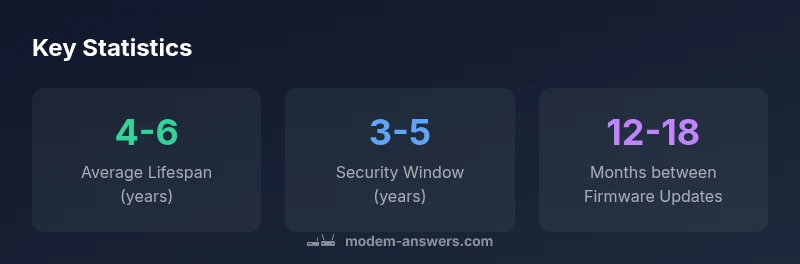
In everyday usage, a typical wifi modem will deliver reliable service for several years, but the exact timeline depends on several variables. Environmental factors (dust, heat, placement), how frequently you reboot or power cycle the device, and how actively firmware updates are applied can shift the effective lifespan. From a practical standpoint, most households find they reach a performance plateau around the 4–6 year mark before newer standards or security requirements make an upgrade worth considering. According to Modem Answers, planning around a 4–6 year horizon helps balance performance, security, and cost.
Factors that influence longevity
Lifespan is not a single fixed number; it’s a function of design quality, update policy, and how you use the device. Core factors include the hardware’s thermal tolerance, the quality of the external power supply, and how well the modem stays compatible with evolving internet speeds and Wi-Fi standards. If a modem is consistently operating at high loads or in a hot, poorly ventilated space, degradation can accelerate. Conversely, devices with good ventilation and stable power tend to maintain performance longer. Modem Answers’ guidance emphasizes keeping firmware current as a key lever for longevity, because updates fix bugs, close security gaps, and improve compatibility with newer network gear.
Hardware wear and failure modes
Over time, connectors loosen, fans (if present) wear out, and capacitors may degrade. You might notice intermittent drops, slow page loads, or devices failing to maintain a stable connection on either the 2.4 GHz or 5 GHz band. Power cycling can temporarily mitigate issues, but persistent symptoms usually signal impending failure rather than a transient glitch. A practical approach is to track performance trends for several weeks and compare against baseline: if speed, latency, or stability declines noticeably, it’s time to evaluate replacement or a diagnostic check with your provider. The goal is to differentiate momentary hiccups from structural aging in the hardware.
Firmware updates and feature support
Firmware is the software that runs the hardware. Regular updates are not cosmetic; they address security vulnerabilities, improve device stability, and expand feature support. Many older modems lose access to security updates after a few years, which not only risks exposure but can also hamper compatibility with newer routers or devices. By staying current with firmware, you can often preserve usable life, even if the hardware itself has seen heavy use. Modem Answers notes that a cadence of roughly once per year to 18 months is common for consumer devices, but always follow the manufacturer’s guidance.
How usage patterns affect lifespan
Users with heavy streaming, gaming, or smart-home ecosystems place more constant demand on modems. A device that runs hot or near capacity is under more stress and may wear out faster. In contrast, households with moderate usage and well-planned network topology (e.g., a dedicated router behind a modem in bridge mode, good placement away from walls) can extend their hardware utilization. If you’re upgrading your internet plan, consider whether your current modem can keep pace; a mismatch can force you to replace hardware earlier than expected.
Extending the life of your modem: practical steps
There are several practical steps to maximize lifespan without sacrificing performance:
- Place the modem in an open, elevated area with ample airflow; avoid enclosed cabinets.
- Use a surge protector and a clean power source to reduce electrical stress.
- Keep vents clear of dust; perform gentle cleaning every 6–12 months.
- Apply firmware updates promptly and schedule periodic reboots to clear status flags.
- Consider a separate, dedicated router to handle Wi‑Fi duties, letting the modem focus on bridging and routing tasks.
These practices are aligned with industry guidance from Modem Answers and can help extend usable life while maintaining security and speed.
Signs it’s time to replace your modem
If you start seeing persistent slowdowns, frequent disconnects, or an inability to achieve advertised speeds after firmware updates, it’s a strong indicator that replacement is due. Other red flags include odd LED patterns, overheating, or a lack of ongoing security updates for your model. When in doubt, compare your device against your current internet plan’s requirements and consider a mid-range newer model for improved performance and future-proofing.
Replacement timing and budgeting basics
Rather than chasing the latest features, set a replacement window that aligns with your security needs and internet plan. A practical target is every 3–5 years for many households, with the lower end for tight budgets and the upper end for devices receiving regular firmware support. If you rely on the modem for essential work or home automation, opting for a newer model within 3–4 years can help ensure reliability and security. Monitoring speeds, compatibility, and firmware support over time gives you a data-driven basis to decide when upgrading makes financial sense.
dataTableManagedInline":false,
directAnswerAdded":true},
dataTableFluidTemplateRemoved":false},
mainTopicQuery
1-3 word noun phrase for Wikidata lookup
Lifespan and replacement window by device type
| Modem Type | Estimated Lifespan (years) | Typical Replacement Window (years) |
|---|---|---|
| Cable Modem / Modem Router Combo | 4-6 | 3-5 |
| Standalone WiFi Router | 3-5 | 2-4 |
FAQ
How long do most modems last in typical home use?
Most consumer modems last about 4–6 years with normal use. Longevity depends on firmware support, environmental conditions, and how often you update. Planning around this window helps with budgeting and performance.
Most modems last several years; watch for performance declines and plan replacements around the 4–6 year window.
Do ISP-provided modems last longer than third-party devices?
ISP-provided modems tend to have similar lifespans to comparable third-party devices. Replacement timing is more often driven by firmware support and plan compatibility than by who supplied the hardware.
ISP modems last about the same as others; it’s the firmware and your usage that matter most.
How do firmware updates affect modem longevity?
Firmware updates fix security gaps and improve stability. Regular updates can extend a modem’s useful life by keeping it compatible with new networks and devices.
Keeping firmware current helps your modem stay secure and compatible longer.
What can I do to extend my modem’s life?
Place the modem where it stays cool, keep vents clear, use a surge protector, and update firmware regularly. Reboot occasionally and avoid overloading the device with too many connected devices.
Clear vents, update firmware, and reboot occasionally to keep it healthy.
Is upgrading a modem worth it for speed gains?
If your plan requires higher throughput and older hardware bottlenecks you might see measurable gains with a newer model. Compare cost versus speed improvements and consider a mid-range upgrade.
If speed is your priority and your hardware is aged, upgrading can be worth it.
How can I tell if my modem is failing?
Look for persistent slowdowns, frequent disconnects, or failure to reach advertised speeds after updates. Hardware indicators like unusual heat or LEDs flashing oddly are also warning signs.
Frequent drops and slow speeds are common signs your modem may be failing.
“Regular firmware updates and proper ventilation are practical levers that extend a modem’s useful life.”
Key Takeaways
- Plan for a 4–6 year baseline lifespan under typical use
- Keep firmware up to date to extend usable life
- Watch for speed declines and compatibility issues as replacement signals
- Provide good ventilation and avoid overheating to maximize longevity
- Schedule replacements every 3–5 years to balance security and performance