How Long Are Modems Good For: A Practical Lifespan Guide (2026)
Discover how long modems typically last, the factors that influence lifespan, signs of aging, and practical steps to extend life. A data-driven guide from Modem Answers.


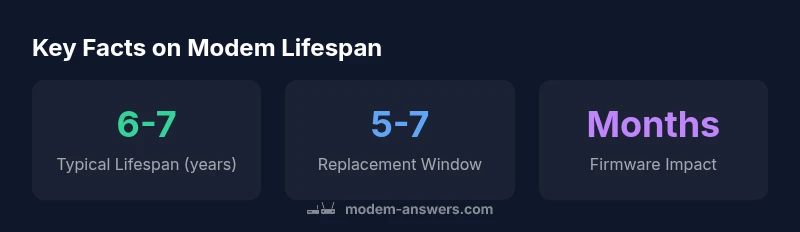
How long are modems good for? In general, most consumer modems remain reliable for about six to seven years with proper care, though lifetime can vary by technology (DOCSIS version), usage intensity, and environmental conditions. For many households, planning a replacement window in the five-to-seven-year range balances performance with cost and compatibility.
Why Modem Longevity Matters
When you ask how long are modems good for, you’re really asking about balancing performance, cost, and reliability. Home networks hinge on a stable modem that can handle evolving speeds, security standards, and the growing number of connected devices. A longer-lasting modem reduces downtime, lowers replacement costs, and minimizes environmental waste. In practice, most households benefit from aligning replacement cycles with major internet-plan upgrades and security updates. According to Modem Answers analysis, maintaining a modem in good condition can help you postpone unnecessary replacements without sacrificing performance. The goal is to maximize utility while staying aligned with your service provider’s technology roadmap. This is especially important for renters who rely on consistent connectivity for remote work and streaming. The core question remains: how long are modems good for, and what steps can you take to extend that life?
How Modem Lifespans Are Measured
Lifespan isn’t a single age but a combination of usable years, feature relevance, and hardware resilience. We measure it by performance stability, compatibility with current service standards, and fault frequency under typical household conditions. A modem can feel “old” even if it still turns on, if it cannot handle newer speeds or frequent firmware updates. In 2026, many households demand DOCSIS 3.1 or newer for future-proofing, which naturally influences the practical lifespan. It’s also important to consider warranty windows and support lifecycles from major manufacturers. The Modem Answers team emphasizes that lifespan is a moving target driven by technology progress and user needs, not a fixed countdown.
Typical Lifespan by Technology
From a practical perspective, the technology inside the modem matters. DOCSIS 3.0 cable modems often offer reliable service for about 5-7 years, while DOCSIS 3.1 devices tend to push toward 6-9 years under normal conditions. Routers and modem-router combos experience similar ranges, though heat and power use can shorten the life slightly in some layouts. A key takeaway is that newer standards are designed to extend useful life by supporting higher speeds and advanced features longer into a service plan. Modem Answers analysis notes that while hardware age matters, support for security updates and compatibility with providers remains a critical constraint. This is why many households spend time evaluating upgrade timing around planned service changes.
Factors That Extend or Shorten Your Modem Life
There isn’t a one-size-fits-all answer to how long modems are good for; instead, several interrelated factors determine lifespan. Core elements include the hardware quality (chipset and cooling design), environmental conditions (temperature, humidity, dust), and how aggressively you push the device with high-bandwidth tasks. Regular firmware updates can improve stability and fix vulnerabilities, potentially extending usable life by months. Power quality is also crucial: surges can damage internal components, so using a reliable surge protector is prudent. Placement matters too—keep the modem in a ventilated area away from heat sources like radiators or direct sunlight. Finally, the rate at which you upgrade your internet plan or replace devices will influence the observed lifespan in real-world settings.
Signs Your Modem Might Be Failing
Recognizing aging hardware early helps you plan replacements before service quality degrades. Common signs include increased disconnects, slower than expected speeds, inconsistent Wi-Fi coverage from a combined unit, and overheating or unusually warm chassis notes. A failing modem may reboot unexpectedly or display unusual indicator lights. If you notice persistent issues despite resetting or reconfiguring equipment, it’s wise to run a diagnostic check with your provider or reseat cables to rule out a simple connection problem. Taking a proactive approach helps you avoid extended downtime and ensures you stay on track with promised speeds and reliability.
Practical Steps to Prolong Modem Health
To maximize the life of your modem, start with placement. Position it in a cool, well-ventilated spot, avoid stacking devices directly on top of it, and keep it away from heat sources. Use a registered surge protector and preserve clean power to minimize spikes. Regularly check for firmware updates and apply them following the manufacturer’s instructions, as these updates can improve performance and stability. Periodic reboots on a scheduled basis can also help, but avoid excessive restarts that may stress the system. Finally, inspect cables for wear and replace worn components promptly. These proactive steps help maintain performance and can modestly extend the usable life of your device.
Planning Replacement: When to Upgrade
Planning for replacement is a practical exercise in balancing cost, performance, and future compatibility. A typical planning window is five to seven years, but the exact timing should consider your internet plan changes, the number of connected devices, and whether your device supports newer standards like DOCSIS 3.1 or Wi‑Fi 6/6E. If you anticipate a speed upgrade or additional devices, upgrading becomes more cost-effective when bundled with a plan change. For renters and homeowners alike, creating a replacement budget and aligning it with service upgrades can prevent surprise expenses while keeping your home network current.
Debunking Myths About Modem Lifespan
A common myth is that modems last “forever” if unplugged from heavy use. In reality, consumer hardware ages due to wear, heat, and evolving standards. Another misconception is that newer is always better; while future-proofing matters, compatibility and service support often drive upgrade decisions. A sensible approach is to monitor performance, track failure indicators, and evaluate whether the cost of continued operation outweighs the benefits of an upgrade. The Modem Answers team recommends using a practical replacement cadence that matches your plan changes and device performance rather than chasing every new feature.
Real-World Scenarios and Quick Guides
Scenario A: You’re on a five-year-old DOCSIS 3.0 modem with steady performance but a growing number of devices. Consider planning a mid-cycle upgrade to DOCSIS 3.1 to accommodate more devices and higher speeds. Scenario B: Your home household has three kids streaming, gaming, and a handful of smart devices. A wired-backbone upgrade might reduce stress on the network and extend the life of your router as a whole. In both cases, periodically reassessing your needs against your equipment helps optimize performance and cost, ensuring you get the most value from your modem within the five-to-seven-year planning window.
Comparison of modem lifespans by technology
| Modem Type | Typical Lifespan (years) | Notes |
|---|---|---|
| DOCSIS 3.0 cable modem | 5-7 years | Older standard; may need replacement sooner; supports fewer high-speed features |
| DOCSIS 3.1 cable modem | 6-9 years | Current standard; longer life with future-proofing |
| Wi‑Fi modem/router combo | 4-6 years | Integrated router adds heat and power load |
FAQ
How long do modems last typically?
Most consumer modems last about 5-7 years with normal use and proper care. Age, heat, and firmware support all influence the actual lifespan. If you notice slower speeds or frequent disconnects, plan for replacement within this window.
Most modems last around five to seven years, depending on usage and maintenance.
Do providers affect modem lifespan?
Yes. Some providers supply rented or subsidized devices that are replaced on set cycles, which can shorten your personal aging window. If you own your own modem, you control replacement timing based on performance and standards.
Yes. Provider policies can influence when you upgrade, especially if you’re renting a device.
Do firmware updates help life?
Firmware updates can improve stability and efficiency, reducing the chance of firmware-related faults. They may extend usable life by months to a year, but only if the modem remains compatible with your service.
Firmware updates can help keep things running smoothly and may push out the need to replace a bit longer.
Is an older modem worth it?
If the older modem supports current speeds and security features, it can be a cost-saving option. However, older standards may limit performance and future compatibility. Weigh the cost against potential upgrade benefits.
If it covers your speeds and you don’t mind slower upgrades, it can be worth it; otherwise consider newer standards.
What are signs a modem is failing?
Frequent disconnects, slow or inconsistent speeds, and unusual lights or overheating are common indicators. If the device feels hot or emits strange smells, unplug it and check the surroundings.
Look for drops in speed, more disconnects, overheating, or strange lights—that’s usually a sign to upgrade or service.
How can I extend my modem's life?
Place the modem in a cool, well-ventilated area, away from heat sources. Use a surge protector and keep firmware updated. Regularly reboot on a schedule and replace power cables if worn.
Keep it cool, up to date, and protected from power surges to get the most life out of it.
“Modem life is a function of age, usage, and maintenance. With proper care and timely updates, most modems remain reliable through the 6–7 year window.”
Key Takeaways
- Assess your modem’s age and performance regularly
- Prioritize newer standards for longer relevance
- Protect against heat and surges to extend life
- Keep firmware updated to maintain efficiency
- Budget for replacement every 5-7 years