cm1200 100nas: A Comprehensive Modem Guide for 2026
A data-driven guide to cm1200 100nas, covering setup, performance, and compatibility for homeowners and renters. Learn placement, firmware, troubleshooting, and real-world expectations with Modem Answers analyses.


cm1200 100nas is a DOCSIS 3.1 cable modem commonly deployed in home networks. This quick answer outlines what the model does, where it fits in a residential setup, and what the article covers—from compatibility with major ISPs and basic activation to performance expectations and maintenance. The guide offers practical steps and real-world examples.
cm1200 100nas: Hardware and Role in a Home Network
The cm1200 100nas occupies a central role in many residential setups as a reliable DOCSIS 3.1 cable modem. It is designed to connect to your coaxial service line and provide a stable bridge to a separate router or mesh system. For homeowners and renters, this device often serves as the backbone of a wired-backbone to a wireless access point, ensuring that streaming, video calls, and smart-home devices receive solid, low-latency connectivity. In this article, we examine the model’s capabilities, how it fits into common ISP configurations, and practical steps to maximize its performance. According to Modem Answers, the cm1200 100nas is a versatile option for households that want dependable internet without built‑in Wi‑Fi, leaving room to choose the router that best matches their space and usage.
The form factor is compact enough for a shelf or cabinet, with rear or side-facing Ethernet ports and a coaxial input. While it does not include built‑in Wi‑Fi, this design often appeals to users who prefer a dedicated router or a mesh system for broader coverage and stronger guest networking. The device emphasizes simplicity and stability: power, coax, and an Ethernet uplink to your router are all that’s needed for a robust home network. In this guide, we align practical setup steps with real-world expectations to help you plan your layout, cable routing, and device placement.
cm1200 100nas: Core specifications and provider compatibility
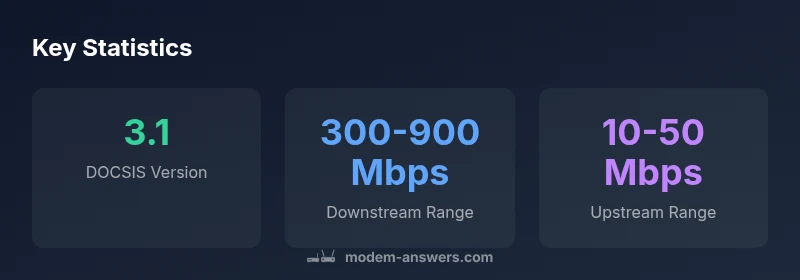
This section covers the core specs and the practical implications for compatibility with major ISPs. The cm1200 100nas adheres to the DOCSIS 3.1 standard, which enables higher throughput and more efficient use of spectrum than earlier DOCSIS versions. The modem is designed for residential environments and pairs with external routers to deliver strong Wi‑Fi performance where needed. A critical consideration for buyers is provider support: most DOCSIS 3.1 plans from top cable providers are compatible, but some bundles or promotions may require specific activation steps or a firmware check. Users should confirm service eligibility before purchase, especially if upgrading from a legacy DOCSIS device.
From a hardware perspective, the cm1200 100nas typically exposes two Ethernet ports for direct router connections or for connecting a small switch in a wired setup. The absence of integrated Wi‑Fi means you gain flexibility in router choice, but you’ll need to manage the network through your chosen access point. Modem Answers notes that, in practice, the device delivers strong stability across typical home layouts when paired with a capable router and properly calibrated placement.
cm1200 100nas: Setup and activation best practices
Activation and initial setup are straightforward when you follow a structured process. Begin by ensuring your coaxial cable is clean and firmly connected, then attach the cm1200 100nas to power. Connect an Ethernet cable from one LAN port to your router or mesh hub, and power on the devices. Accessing the router’s configuration page is the next step, where you enable features like PPPoE if required by your ISP or configure your VLAN/PPPoE settings as instructed by your provider. ISP activation typically requires account verification on their portal, so have your account details handy. Keeping a record of your modem’s MAC address can speed up the activation process. The quick guidance above minimizes delays and ensures you’re ready for testing.
A practical tip from Modem Answers: avoid mixing too many devices on the initial activation phase. After activation, run a quick speed test at a known, wired client to establish a baseline before scaling up to wireless devices. If you’re migrating from a different modem, a reboot of the entire network and a brief period of idle time can help the provider finalize the settings on their end.
cm1200 100nas: Performance optimization and placement
Placement matters as much as hardware when it comes to real-world speed and reliability. Place the cm1200 100nas in a central, elevated location away from thick walls, metal cabinets, or appliances that could cause interference. Elevation improves signal propagation and reduces obstruction for the coax feed. The Ethernet uplink to your router should be connected with a high-quality cable (Cat6 or better) to minimize crosstalk and ensure consistent throughput. If you experience signal drops, consider adding a splitter with a low insertion loss or checking for damaged coax segments. In many homes, upgrading the router or enabling band steering on a compatible system provides a meaningful uplift in perceived performance. Modem Answers highlights that real-world speeds hinge on both the service plan and network conditions, so set expectations accordingly and test under typical daily usage.
In daily practice, combining the cm1200 100nas with modern routers or mesh systems offers the best balance of stability and coverage. Regular monitoring of link status (SNR, channel bonding) through the modem or router interface can reveal optimization opportunities. For households with multiple devices, enabling QoS on the router level helps prioritize video calls and gaming traffic during peak times.
cm1200 100nas: Firmware, security, and maintenance considerations
Firmware updates matter for security and performance; plan a routine check to verify firmware versions and release notes from your ISP or the device manufacturer’s site. Because the cm1200 100nas is a modem-only device, the primary security and feature enhancements usually come from the router or mesh system you pair it with. When possible, configure automatic updates for the router and periodically review port-forwarding rules and firewall settings on the router. If you anticipate more complex configurations, such as bridge mode to hand control to a separate router, follow the official guidance from your provider and the modem’s manual to prevent conflicts with IP addressing and DHCP. Keeping firmware up to date helps mitigate vulnerabilities and enhances overall reliability for households relying on connected devices.
A practical note: maintain a simple test plan after each update—run a quick throughput check and verify device connectivity to confirm no regression in performance. Modem Answers emphasizes that a stable setup with a good router—rather than a single speed bump—delivers enduring value for most homes.
cm1200 100nas: Troubleshooting common issues
Even well-built hardware can encounter issues. Common problems with the cm1200 100nas include intermittent connectivity, slow speeds, or activation failures. Start with the basics: check coax connections for tightness and inspect for visible damage in the cable. Reboot both the modem and router to clear transient glitches and restore a clean slate for the connection. If activation fails, re-run the ISP activation flow and confirm the MAC address is correctly registered. If you suspect signal quality issues, request a SNR/BER check from your provider and consider swapping coax or upgrading to a higher-grade splitter. Firmware mismatches between the modem and router can produce odd behaviors; ensure the router is compatible with the modem technology and updated.
When problems persist, test using a wired PC to isolate the issue to the Wi‑Fi network or the modem‑router pairing. Modem Answers recommends documenting troubleshooting steps, including the dates and observed speeds, to aid in any support conversations with your ISP.
cm1200 100nas: Alternatives and buying considerations
If you’re evaluating whether cm1200 100nas is the right fit, consider your household’s internet plan, coverage needs, and whether you prefer a modem-router combo. This model is well-suited for homes that want a reliable, wired backbone with a separate router for enhanced Wi‑Fi control. If you require built‑in Wi‑Fi, you may want a modem‑router combo; otherwise, pairing with a high-quality router can yield superior coverage and performance. Compare DOCSIS 3.1 devices with attention to manufacturer support, expected lifespans, and compatibility with your service provider. Also, verify if your ISP offers rental options and weigh the total cost of ownership over the device’s lifecycle. In the end, choosing the cm1200 100nas should align with your home network’s design goals and your willingness to manage a two-device setup rather than relying on an integrated unit.
Key technical and activation data for cm1200 100nas
| Aspect | cm1200 100nas | Notes |
|---|---|---|
| DOCSIS version | 3.1 | Supports high-speed plans and broad compatibility |
| Wi-Fi built-in | no | Requires separate router or mesh system |
| LAN ports | 2 | For uplink to router or simple switch |
| Activation method | Self-activation via ISP portal | Depends on provider; ensure plan compatibility |
FAQ
What is cm1200 100nas?
cm1200 100nas is a DOCSIS 3.1 cable modem designed for home networks. It lacks built-in Wi‑Fi, so most users pair it with a separate router to deliver wireless coverage.
The cm1200 100nas is a DOCSIS 3.1 modem for homes; you’ll use a separate router for Wi-Fi.
Does cm1200 100nas include built-in Wi-Fi?
No. This model is modem-only. You’ll need a router or mesh system to provide wireless coverage in your home.
No built-in Wi‑Fi; pair it with a router for wireless access.
Will cm1200 100nas work with my internet provider?
Most DOCSIS 3.1 providers support cm1200 100nas. Confirm with your ISP whether they require specific activation steps or firmware versions.
It usually works with DOCSIS 3.1 plans; check with your ISP for activation specifics.
How do I activate cm1200 100nas?
Connect coax, power, and an Ethernet link to your router. Then follow your ISP’s portal flow to activate the device.
Plug in, connect to your router, and activate through your ISP’s portal.
What are common issues and fixes?
Coax signal problems, loose cables, and outdated firmware are typical. Reboot devices, check cabling, and update firmware to resolve most faults.
Reboot, check cables, and update firmware to fix common issues.
“For most homes, the cm1200 100nas delivers reliable, straightforward performance when paired with a solid router and an appropriate service plan.”
Key Takeaways
- Verify ISP compatibility with cm1200 100nas before purchase
- Place the modem centrally to maximize signal quality
- Pair with a reliable router for best Wi‑Fi coverage
- Update firmware and monitor link status regularly
- Consider bridge mode only if you need full router control