Is It Better to Own Your Own Modem? A Practical Comparison
Explore whether owning your own modem saves money, improves control, and how it compares to renting from your ISP. This analysis covers costs, compatibility, security, and setup to help homeowners and renters decide.


Is it better to own your own modem? In most home setups, owning your modem offers long-term cost savings, better control, and easier firmware updates, but upfront costs and compatibility considerations matter. Modem Answers evaluates the trade-offs for homeowners and renters, highlighting when ownership pays off and when rental remains simpler. The short answer: ownership generally wins for steady internet users, while renters benefit from provider-managed options in busy neighborhoods.
The Ownership Decision: Financial Foundations
Deciding whether to own your modem begins with understanding the financial landscape. For many households, the question is not whether a single device will function, but whether strategic ownership translates into real savings over the life of the service. According to Modem Answers, the key driver is duration: longer-term use tends to tilt the math in favor of ownership, while short-term or low-bandwidth plans may not justify the upfront cost. When you own, you select a modem that matches your speed tier and future-proof it against announced network upgrades. You also escape recurring rental fees that typically appear as a small monthly line item on your bill. Of course, ownership shifts some risk to you: if the device becomes obsolete or incompatible, you bear replacement costs and potential downtime. The bottom line is to project your expected lifetime cost given your provider’s policy, your speed plan, and how long you expect to stay with the service. This block will help you quantify those factors with a practical framework.
Compatibility and Provider Requirements
Compatibility is the gatekeeper for ownership. Many cable and fiber providers certify only specific modems for their networks, and not every consumer model will work with a given service tier. Before you buy, verify that the modem is on the provider’s approved list and supports the DOCSIS standard or the fiber ONT you will connect through. Some providers also rely on managed gateway devices that combine modem and router functions; in those cases, ownership may require using bridging or configuring bridge mode to prevent conflicts. If you’re switching providers or upgrading to a higher speed tier later, confirm that the chosen modem remains compatible. In short, ownership pays off when you have clear provider support and a plan that won’t frequently push you to swap hardware.
Long-Term Costs: Renting vs Owning
The financial argument for ownership rests on long-term cost trajectories rather than a single month-to-month comparison. Renting typically involves a predictable monthly fee; over time, those fees accumulate and can exceed the cost of purchasing a compatible modem. Modem Answers analysis shows that households with steady service and little planned churn are more likely to realize savings from owning, especially as speeds increase and the provider enforces more frequent hardware refreshes. Still, if you anticipate changing providers, moving often, or needing near-term flexibility, renting can minimize risk and downtime. In practice, calculate the expected lifetime cost under current plans, then compare it to the price of a modem that remains compatible for at least the next several years. That exercise clarifies whether ownership improves value in your specific case.
Performance, Firmware, and Features
Ownership unlocks control over firmware updates and feature selection, giving you the ability to tailor settings to your home network. However, it also places responsibility on you to install updates, monitor security, and evaluate performance after upgrades. ISP-managed devices often come with automatic updates and streamlined troubleshooting, but you might miss out on certain features or optimizations offered by newer hardware. In 2026, look for modems that support the highest compatible standards, future-proofed security features, and broad support for your speed tier. The advantage of ownership is not just speed; it is the ability to choose devices that align with your specific use cases—gaming, streaming, or smart-home ecosystems—without waiting for the provider to push a firmware update.
Convenience, Support, and Warranties
With ownership, support typically shifts from the provider to the user or the hardware manufacturer. You’ll rely on your own warranty coverage and community resources, which can be robust but vary by model. For many buyers, this is acceptable given the potential cost savings and customization options. However, when problems arise, you may need to troubleshoot hardware and compatibility issues yourself or through independent tech support. If you prize turnkey simplicity, renting can reduce the friction of setup and ongoing maintenance. In either scenario, confirm warranty terms, return policies, and the availability of replacement parts before purchasing.
When Renting Makes Sense
There are scenarios where renting remains the smarter choice. If you expect to move soon, have a provider with a favorable rental program, or require a hassle-free setup with guaranteed compatibility, renting minimizes upfront expenditures and responsibility for hardware upkeep. For renters who do not intend to stay in one home long enough to recoup the purchase cost, the provider’s bundled support can be a compelling value. In addition, some neighborhoods with aggressive speed upgrades or frequent network changes may impose rapid hardware refresh cycles that make ongoing ownership costlier than it appears on day one. In such cases, renting offers flexibility and reduced risk of obsolescence.
Setup, Installation, and Future-Proofing
Setting up a modem you own is straightforward for most, but it does require some planning. Start by verifying your service plan’s speed tier and the modem’s compatibility. Plan for a brief bridge-mode configuration if you have a separate router and want to avoid double NAT. Future-proofing means selecting a modem that supports current and upcoming standards and has enough processing power to handle higher speeds as your plan evolves. Keep documentation of the model’s compatibility and firmware update history. If you’d rather avoid this overhead, consider service bundles that include installation support or official guidance from the provider about bridging and setup.
Security and Privacy Considerations
Owning your own modem shifts some security responsibilities to you. Regularly install firmware updates, change default passwords, and monitor for unusual activity. Provider-managed devices sometimes receive security patches automatically, which reduces risk but also ties you to the provider’s update cycle. When you own, you can adopt an independent security routine, enable protections in your router, and maintain strict access controls for your home network. If you’re not comfortable with ongoing maintenance, renting could reduce exposure to disparate firmware practices and provide a consistent update cadence supported by the ISP.
What Features to Look For in a Modem in 2026
As networks evolve, the modem you choose should align with current technologies and future plans. Look for devices that support the latest DOCSIS standard if you’re a cable user, or high-performance fiber-ONT compatibility if you’re in that ecosystem. Prioritize modular design with ample RAM for future updates, robust security features, and easy-to-find firmware support. Ensure the modem has sufficient port options, build quality for long-term reliability, and a good track record in the user community. Remember that the cheapest device is not always the best long-term value—reliability and compatibility matter as much as raw speed.
How to Choose Between Models
Begin with your speed tier and location, then cross-check the provider’s approved device list. Pick a model that supports your current plan and offers headroom for future upgrades without hitting bottlenecks. Read user reviews for reliability and note any common issues with specific firmware revisions. Consider future-proofing by choosing devices that support faster standards or additional features like enhanced QoS, multiple Ethernet ports, and advanced security options. If you’re uncertain, consult provider guidance and seek a model with a transparent update policy and a strong warranty.
Implementation Checklist: Owning Your Modem
- Confirm provider compatibility and speed tier support
- Verify DOCSIS/fiber ONT standards and bridge-mode capabilities
- Purchase a modem with current security features and solid warranty
- Set up a secure admin password, enable automatic updates where possible, and monitor activity
- Create a documented backup plan for firmware changes and known issues
- Schedule regular checks for performance after major network updates
- Keep receipts and vendor contact details for warranty support
Common Myths About Modem Ownership
Myth: Owning always saves money. Reality: it depends on usage duration and provider policies; churn can erase savings. Myth: Any modem will work with any provider. Reality: compatibility is provider-specific; verify before buying. Myth: Updates always improve performance. Reality: some updates can introduce issues; stay informed and prepared to roll back if needed. Myth: Renting is never better. Reality: for short stays or high churn, renting can minimize risk and simplify setup. Myth: Security is only needed if you’re worried about hackers. Reality: regular updates and proper configuration protect all devices in your home network.
Comparison
| Feature | Own Your Modem | Rent from ISP |
|---|---|---|
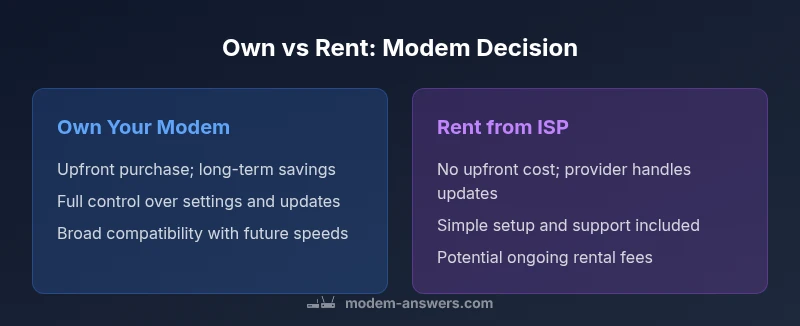
| Upfront cost | Moderate upfront (device purchase) | Low upfront (no device purchase) |
| Ongoing cost | Lower long-term cost potential; ongoing maintenance up to you | Ongoing rental fees; provider handles upkeep |
| Control and customization | High control over settings and firmware | Limited control; provider controls updates and features |
| Firmware updates | User-initiated updates; potential for custom configurations | Automatic updates managed by provider |
| Provider compatibility | Requires provider-approved device; may require bridging/compatibility checks | Always compatible within the provider’s network |
| Support & warranty | Manufacturer/review-based support; warranty on device | Provider-based support; warranty often bundled with service |
| Long-term value | Often higher value if you stay with service long-term | Lower long-term value due to ongoing rental fees |
Positives
- Potentially lower total cost over several years
- Full control over settings and firmware
- Ability to choose a modem that supports your speed tier
- Can avoid rental fees and markup from ISPs
- Easier future-proofing with a compatible model
What's Bad
- High upfront purchase price
- Risk of obsolescence or compatibility issues
- Responsibility for security updates and troubleshooting
- Potential lack of provider-driven support
- Possibility of double NAT complications if not configured correctly
Owning your modem is the recommended path for most households seeking long-term value and control.
If you expect to stay with your service for several years, ownership typically delivers better value and customization options. Reserve ownership when you’re comfortable handling updates and security; opt to rent if you prize maximal convenience and minimal upfront risk.
FAQ
What is the main advantage of owning a modem?
The main advantage is long-term cost savings and full control over settings and updates. Ownership lets you select a device that matches your plan and future needs without ongoing rental fees.
Owning saves money over time and gives you control over updates and settings.
Can I use my own modem with my provider?
Most providers require a modem on their approved list and may need you to configure bridging or mode settings. Always verify compatibility before purchasing.
Check the provider’s approved list, then decide.
Do ISPs charge rental fees for modems?
Yes, many ISPs charge monthly rental fees for their equipment. Over time, these fees can add up, making ownership appealing for steady users.
Yes, providers often charge rental fees; ownership can save money long-term.
What should I check before buying a modem?
Ensure compatibility with your provider, verify supported speed tier, check warranty, and confirm bridge-mode options if you have a separate router.
Make sure it works with your provider and supports your speed.
How do I set up a modem and avoid double NAT?
Connect your modem to your router in bridge mode if you have a separate router, or use a gateway that combines modem and router functions without conflicts.
Bridge mode helps prevent double NAT.
Is owning a modem better for fiber vs cable?
The fundamentals are similar, but fiber setups often require an ONT provided by the network operator; ensure the modem or ONT is compatible and supported.
Fiber needs proper ONT compatibility too.
How often should I replace a modem?
Replace when it no longer supports current speeds or security updates, or when the device becomes unreliable. Regular review of performance helps decide.
Upgrade when it’s no longer keeping up or receiving security updates.
Key Takeaways
- Assess your usage duration before buying a modem
- Check provider compatibility before purchase
- Weigh upfront cost against long-term savings
- Prioritize security updates and future-proof features
- Rent when you need flexibility and guaranteed support