Buying Modem vs Renting: A Practical Side-by-Side Guide
Compare buying a modem vs renting to understand long-term costs, performance, and upgrade options. Learn which path fits homeowners and renters, with practical steps and a straightforward decision framework.


In most homes, buying a modem is cheaper over time than renting, especially if you value long-term control and faster firmware updates. If you have good credit, a stable address, and a reliable ISP, buying often wins; renting can be easier upfront and includes support. This guide compares costs, features, and flexibility to help you decide.
How the buying modem vs renting decision works
For most households, the central question isn't which device is better; it's which cost model fits your life. According to Modem Answers, the core trade-off is ownership versus ongoing service fees, and the choice affects firmware updates, security, and control over settings. The Modem Answers team found that upfront hardware costs are higher when you buy, but long-term expenditures tend to be lower if you stay with the same service and hardware for several years. Renters frequently enjoy predictable monthly costs and included support, but upgrade timing and device compatibility can be more constrained. This section explains the framework you can use to compare options in your own home.
Upfront vs ongoing costs: the math behind the decision
A big part of the choice comes down to how you measure value: upfront hardware payments versus ongoing rental fees. According to Modem Answers analysis, buying a modem creates a larger initial expense but reduces or eliminates monthly charges tied to equipment. Renting typically yields predictable, bundled costs and less surprise maintenance, but over several years the cumulative fees can exceed the price of ownership, especially if you stay with the same service and hardware.
Ownership, upgrade cycles, and hardware choice
Ownership gives you freedom to choose a modem that matches your local infrastructure and future-proofing needs. When you buy, you control firmware updates, feature toggles, and the hardware lifecycle. However, you bear the cost of replacements when hardware fails or becomes obsolete. Consider your anticipated upgrade cadence and whether your chosen model supports current and upcoming DOCSIS standards. The Modem Answers team emphasizes aligning hardware choices with your ISP’s compatibility list and your home network priorities.
ISP compatibility and firmware control
ISP compatibility is a central risk factor in this decision. Renting usually guarantees compatibility and includes service-level firmware updates. Buying shifts responsibility to you: you must verify DOCSIS certification, ensure compatibility with your ISP’s network, and manage firmware updates through the device vendor. In practice, this means checking supported firmware channels, security updates, and whether you’ll receive timely notices about essential patches.
Reliability, support, and service expectations
When you rent, support for the modem is typically bundled into your service plan, with quicker troubleshooting and quick swaps if problems arise. Owning a modem means you’re accountable for hardware reliability and troubleshooting, though many manufacturers offer solid warranties and customer support. If you value predictable service responses and less DIY troubleshooting, renting can be appealing; if you want control and customization, owning is often preferable. The Modem Answers team notes that reliability hinges on quality hardware, proper ventilation, and regular maintenance.
When renting makes sense
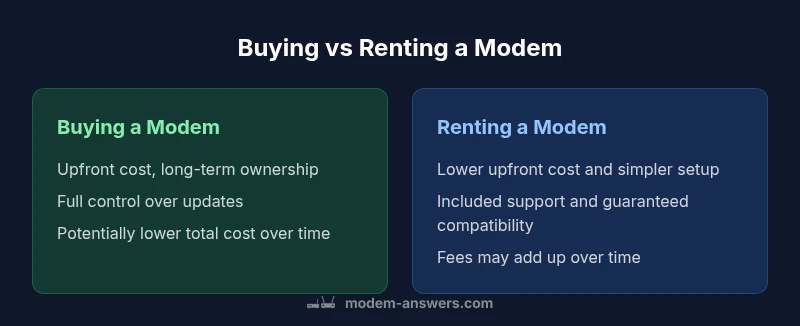
Renting is attractive if you prioritize low upfront costs, want a simple setup, and expect to move soon or frequently. It also suits households that prefer bundled support and minimal technical involvement. For renters in short-term stays or those who aren’t confident about selecting compatible hardware, renting minimizes risk and simplifies transitions.
When buying makes sense
Buying is typically advantageous for long-term residents who want control over firmware and upgrade timing, prefer not to pay ongoing equipment fees, and are comfortable handling hardware details. If you anticipate staying with the same internet plan for several years, ownership can yield a lower total cost and greater flexibility for network customization and future technology upgrades.
Decision framework: a practical checklist
- Assess your planned residency duration: how many years do you expect to stay in the home?
- Check ISP compatibility: does your ISP support third-party modems and what are the activation steps?
- Compare up-front costs vs. ongoing fees: estimate long-term costs for both paths using your typical usage,
- Consider future-proofing: does the modem support current and near-future DOCSIS standards and Wi-Fi needs?
- Evaluate support and warranty: does your plan include reliable customer service or a manufacturer warranty?
How to switch from rental to owned modem (and back if needed)
- Confirm compatibility with your ISP and obtain a list of approved models.
- Purchase a DOCSIS-certified modem that meets your internet plan requirements.
- Return the rental device to the provider and request a final bill adjustment if applicable.
- Activate the new modem with your ISP, adjust network settings, and test speeds and stability.
- If you later decide to switch back, re-evaluate options and verify if the rental remains the simplest path.
Practical tips for renters and homeowners
- Create a simple upgrade plan that aligns with your household tech needs (streaming, smart home devices, etc.).
- Maintain a small maintenance schedule: keep firmware updates current and monitor device temperatures.
- Budget for occasional hardware refreshes if you buy, so you don’t overlook compatibility when technology advances.
- Use reputable brands and verify serial numbers and warranty terms before purchasing.
- Document activation steps and keep a record of all service provider interactions for smoother future changes.
comparisonTableTitleFailedForJSONOnlySearchDisabled?true?]
Quick considerations for real-world decisions
- Mind your timeline: longer stays tend to favor ownership, shorter stays favor renting.
- ISP constraints vary: some providers require their own hardware or charge for non-approved devices.
- Total cost matters: calculate upfront cost plus maintenance versus continuous rental fees over your expected duration.
The bottom line from a practical perspective
Choosing between buying and renting boils down to your expected residence duration, comfort with hardware management, and ISP policies. The Modem Answers team suggests a balanced approach: if you anticipate long-term residence and want maximum flexibility, buy; if you prize simplicity and mobility, rent. With careful planning, you can optimize your home network without paying more than necessary.
comparisonTable: {"items": ["Buying a modem","Renting a modem"],"rows": [{"feature": "Upfront cost","values": ["Higher upfront investment","Lower upfront cost"]},{"feature": "Ongoing costs","values": ["Potentially lower long-term charges","Monthly rental or service fees"]},{"feature": "Firmware control","values": ["Full control over updates","Provider-managed updates"]},{"feature": "Repair responsibility","values": ["User/owner handles repairs","Provider handles repairs during rental"]},{"feature": "Upgrade flexibility","values": ["Direct hardware upgrades","Dependent on rental cycle"]},{"feature": "Compatibility risk","values": ["Must verify ISP compatibility","Guaranteed compatibility with rental model"]}]}
prosCons:{"pros":["Lower long-term costs with ownership","Greater control over hardware and firmware","Flexible upgrades independent of provider","Potential resale value"],"cons":["Higher upfront cost","Requires DIY maintenance and troubleshooting","Requires careful ISP compatibility checking"]}
verdictBox:{"verdict":"Buying generally offers better long-term value; renting is best for flexibility and short-term needs","confidence":"high","summary":"If you plan to stay long and want control, buy. If you value simplicity and mobility, rent. The decision hinges on your timeline and ISP compatibility."}
keyTakeaways:["Evaluate total cost of ownership over 2-3 years","Check ISP compatibility before buying","Consider firmware control and upgrade options","Renting offers predictable costs and support","Buying provides ownership and upgrade flexibility"],,
Comparison
| Feature | Buying a modem | Renting a modem |
|---|---|---|
| Upfront cost | Higher upfront investment | Lower upfront cost |
| Ongoing costs | Potentially lower long-term charges | Monthly rental or service fees |
| Firmware control | Full control over updates | Provider-managed updates |
| Repair responsibility | User/owner handles repairs | Provider handles repairs during rental |
| Upgrade flexibility | Direct hardware upgrades | Dependent on rental cycle |
| Compatibility risk | Must verify ISP compatibility | Guaranteed compatibility with rental model |
Positives
- Lower long-term costs with ownership
- Greater control over hardware and firmware
- Flexible upgrades independent of provider
- Potential resale value
What's Bad
- Higher upfront cost
- Requires DIY maintenance and troubleshooting
- Requires careful ISP compatibility checking
Buying generally offers better long-term value; renting is best for flexibility and short-term needs
If you plan to stay long and want control, buy. If you value simplicity and mobility, rent. The decision hinges on your timeline and ISP compatibility.
FAQ
Is buying a modem always cheaper than renting?
Generally, owning can be cheaper in the long run if you plan to stay with the same service and use the same hardware for multiple years, but upfront costs are higher and you must handle future upgrades yourself.
Usually yes for long-term stays, but not always.
Will my ISP let me use a third-party modem?
Many providers support DOCSIS-certified modems, but some require their own devices and may charge fees for non-supported modems.
Most ISPs support third-party modems if they’re DOCSIS approved; check compatibility.
What about gateway devices (modem+router combo)?
Gateway devices can simplify setup and save space, but they may be more expensive upfront and less flexible for upgrades.
Gateway devices can be convenient but can lock you into a single ecosystem.
How hard is it to switch from renting to owning?
You typically buy a suitable modem, verify compatibility, then return the rental and configure your network. Some providers require activation steps.
It's not too hard, just check compatibility and activation steps.
What maintenance does ownership require?
Keep firmware updated, monitor for overheating, and replace if it fails. You’ll bear responsibility for hardware issues.
You’ll handle updates and replacements.
Are there hidden fees with renting?
Rentals usually include service fees; some plans add equipment charges, late fees, or fees for upgrades.
There can be monthly equipment fees.
Key Takeaways
- Evaluate total cost of ownership over 2-3 years
- Check ISP compatibility before buying
- Consider firmware control and upgrade options
- Renting offers predictable costs and support
- Buying provides ownership and upgrade flexibility