Does a New Modem Make a Difference? A Practical Buying Guide
Explore whether upgrading your modem improves speed, reliability, and Wi‑Fi in real homes. Practical guidance, setup tips, and a clear buying path from Modem Answers.


Yes, in most homes a new modem can make a noticeable difference in performance, reliability, and Wi‑Fi coverage—especially if your current device is older, your plan requires faster DOCSIS support, or you have many connected devices. This guide compares buying a new modem versus continuing with your existing equipment, and outlines when upgrade is worth the investment. According to Modem Answers, the decision often hinges on your internet plan, device count, and how you use the network.
Does a new modem make a difference in real homes? The short answer is yes, but the magnitude depends on several factors. The Modem Answers team emphasizes that the most tangible benefits come from modern DOCSIS support, improved Wi‑Fi radios, and better overall device management. If your current modem is older than five years, or your internet plan has evolved to require newer standards, upgrading can translate into more stable streaming, fewer buffering events, and a more reliable video conference experience. This article uses a practical lens to help homeowners decide whether upgrading is worth the investment, factoring in usage patterns, home size, and the realities of provider compatibility.
The key takeaway is to connect your upgrade decision to how you actually use the network. If you host multiple devices, rely on video calls, or enjoy high‑definition streaming, a newer modem often reduces bottlenecks and improves indoor coverage—especially when paired with a capable router. Modem Answers’ analysis highlights that upgrades tend to yield the most noticeable improvements where devices are dense and the current hardware is the bottleneck. While numbers vary by region and plan, the qualitative benefits—stability, consistent speeds, and fewer service interruptions—are common across many households.
As you read on, you’ll see a balanced view: there are compelling reasons to upgrade, but the cost and compatibility considerations matter. The guidance here is designed for homeowners and renters who want a straightforward path to better home networking without overpaying for features they won’t use. The following sections translate technical specs into practical outcomes you can expect in daily life.
Comparison
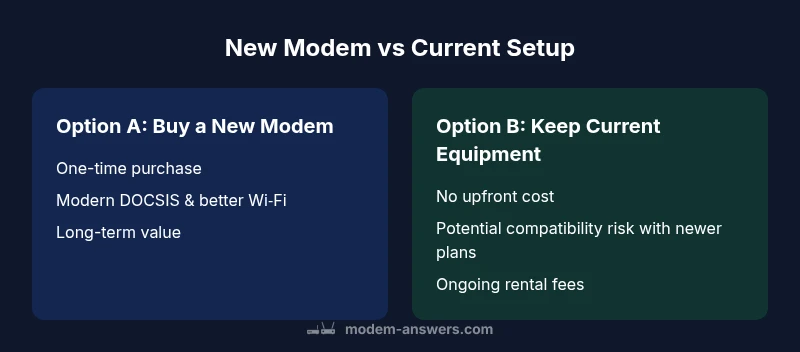
| Feature | Option A: Buy a new modem | Option B: Keep current equipment / rent from provider |
|---|---|---|
| DOCSIS & Wi‑Fi capabilities | Modern DOCSIS 3.1+/Wi‑Fi 5/6 with MU‑MIMO and OFDMA on select models | Older DOCSIS 3.0 or earlier; separate router often needed |
| Provider compatibility | Broad compatibility with major providers; check plan requirements | May require rental device or limited support for newer standards |
| Setup and activation | One-device activation; many models offer bridge mode and built‑in gateway options | Activation typically handled by provider; potential setup complexity |
| Cost and value over time | One-time purchase; potential long-term savings if keeping device for years | Ongoing rental fees; easier mid‑term cost management, but higher long‑term cost |
| Wi‑Fi coverage in medium/large homes | Stronger radios, multiple antennas; better coverage when paired with a modern router | Coverage depends on current router; may require future upgrade |
| Future-proofing | Better readiness for fast internet tiers and smart home growth | Limited future proofing if device is older |
Positives
- Potential long-term savings compared with ongoing rental fees
- Improved Wi‑Fi performance and device management
- Better compatibility with newer internet plans and services
- Greater control over firmware updates and features
What's Bad
- Upfront cost can be a barrier for some households
- Risk of choosing a model that isn’t fully compatible with your plan
- If you don’t upgrade router performance, gains may be limited
Buying a new modem is usually the better long-term choice for most homes seeking reliability and value
A purchase makes sense when you anticipate staying put and want future-ready hardware. If you frequently move or prefer a no-hassle option, renting may be simpler, but it typically costs more over time.
FAQ
Will a new modem always improve internet speed?
Not always. Real upgrades depend on your plan, the provider, and how your home network is configured. A newer modem can improve stability and Wi‑Fi performance, especially in crowded networks, but speeds ultimately hinge on the service tier you subscribe to.
A newer modem often helps with stability and coverage, but actual speeds depend on your plan and network conditions.
Renting vs buying a modem — which is better?
Buying usually saves money in the long run and gives you ownership over the hardware. Renting is simpler and includes service support, but ongoing fees add up over time.
Buying tends to save money long-term, while renting is easier if you want hassle-free support.
How do I check if my provider supports a given modem?
Visit your provider’s official device compatibility page and search for your exact modem model. Ensure your internet plan is compatible with the modem’s DOCSIS standard and features.
Check your provider’s site for approved models and plan requirements.
Will a new modem improve gaming latency?
A newer modem with better processing and traffic management can reduce jitter and packet loss in some setups, which helps with gaming. Latency is also influenced by your ISP routing and the game server.
Yes, it can help with stability and lag if your current hardware bottlenecks.
Do I need a technician to install a new modem?
Most installations are plug-and-play. Your provider may assist with activation remotely, and you can often bridge a modem to a separate router if desired.
Usually you can set it up yourself; activation is often online or over the phone.
What is a reasonable payback period for a new modem?
Payback varies by rental costs and purchase price; there’s no universal period. Calculate by comparing total rental fees over time to the one-time cost of the modem.
There isn’t a universal payback period; compute based on rental fees versus purchase cost.
Key Takeaways
- Assess your current plan and usage before upgrading
- Choose a modem that supports modern DOCSIS and Wi‑Fi standards
- Buying often saves money long‑term compared with renting
- Consider built-in gateway features vs separate router needs
- Run a speed test before and after upgrade to verify real gains