Can You Buy a Modem? A Practical Guide for Home Internet
Learn whether to buy a modem, how to pick a compatible model, and tips to save money while keeping your home network fast and secure.


Yes—can you buy a modem? Absolutely. You can choose a brand-new, refurbished, or used unit from retailers or manufacturers. Before purchasing, verify provider compatibility (DOCSIS version, supported speeds, and activation method) and decide whether you want a standalone modem or a combined modem-router gateway. Compare total ownership costs to ongoing rental fees to determine the best option.
Can you buy a modem? Yes, you can. Owning a modem gives you more control over your home network and long-term costs, but it also requires upfront research and careful compatibility checks. According to Modem Answers, many households benefit from an informed purchase because it reduces ongoing rental fees and unlocks quicker upgrades. In practice, buyers weigh options like brand-new devices, refurbished units with warranties, or gently used modems from reputable sellers. The core question remains the same: can you buy a modem that fits your service plan, your home, and your future needs? The answer is yes, with due diligence. This opening section establishes the idea that ownership is feasible, affordable, and often the smarter financial move when you stay on the same ISP for an extended period. The content that follows digs into specifics so you can act confidently.
note
Tools & Materials
- Coaxial cable(Use the existing run; ensure it’s in good condition and snugly connected.)
- Ethernet cable (Cat5e or better)(Needed to connect a router or computer to the modem.)
- Power adapter and outlet(Modems require a standard power outlet; ensure surge protection if possible.)
- ISP account details(Have your account username, password, or activation PIN handy for provisioning.)
- Warranty/return information(Keep documentation in case of defects or dissatisfaction.)
- MAC address & model number(Useful for pre-activation checks or resale documentation.)
Steps
Estimated time: 45-90 minutes
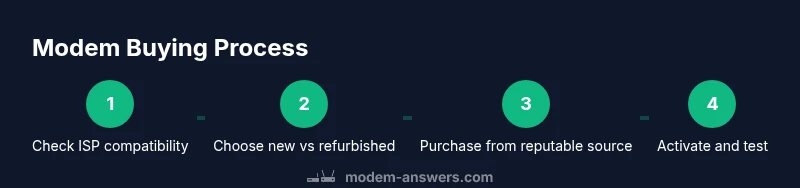
- 1
Check ISP compatibility
Start by visiting your provider’s official site or calling support to confirm which modems are approved for your plan. Note the DOCSIS version required and any activation steps. This ensures the device will work when you connect it and saves time later.
Tip: Record the exact model name, DOCSIS version, and activation process for easy reference. - 2
Choose new vs refurbished or used
Decide based on budget, warranty needs, and risk tolerance. New units come with full warranties; refurbished or used devices may save money but require careful verification of status and return policies.
Tip: Ask for the device’s serial number and check the seller’s warranty window before purchase. - 3
Verify ports and capabilities
Ensure the modem has at least one Ethernet port and evaluate whether a gateway (modem with built-in Wi-Fi) is preferable for your space and device count. For faster speeds, target a DOCSIS 3.1 device if your plan supports it.
Tip: If you plan to add mesh Wi‑Fi, a modem-only option can be cheaper and simpler long-term. - 4
Purchase from reputable sources
Buy from the manufacturer’s store, major retailers, or reputable refurbishers. Avoid sellers with thin return policies or questionable warranty terms to reduce risk of counterfeit or defective products.
Tip: Check recent customer reviews and confirm return windows before purchase. - 5
Collect activation details
Before you connect, gather your ISP’s activation steps, your account credentials, and the MAC address of the device if required. This streamlines provisioning and minimizes delays.
Tip: Label the MAC address on the device so you can reference it quickly if needed. - 6
Connect, activate, and test
Connect the modem to coax, attach a router if you’re not using a gateway, power up, and begin activation through the provider’s portal or app. Run a quick speed test to verify the expected up and down speeds.
Tip: If activation stalls, restart the modem and clear browser caches before retrying. - 7
Secure and optimize
Update firmware if prompted, enable strong Wi‑Fi passwords, and configure basic security features (guest network, network name, and firewall settings). Regularly restart devices to maintain performance.
Tip: Change the default admin password on any gateway or router immediately. - 8
Document your setup
Save model numbers, order receipts, activation confirmations, and any settings configurations. Having a documented baseline helps with future upgrades or troubleshooting.
Tip: Create a simple one-page checklist with essential details. - 9
Plan for upgrades
If you anticipate faster speeds or more devices, select models with future-proof features like DOCSIS 3.1 compatibility and multiple Ethernet ports for easy expansion.
Tip: Avoid outdated hardware that cannot support your future plans.
FAQ
Can I buy a modem without having service?
Yes, you can buy a modem even if you don’t have service yet, but you will need activation from an ISP to use internet. The device will function on your local network, but activation with your provider is required to access the internet.
You can buy it before service starts, but you’ll need activation later to get online.
Should I buy or rent from my ISP?
Buying usually saves money over time because there are no monthly rental fees. If you expect to stay with the same plan for several years, owning is often the smarter choice, but compare upfront costs and warranty terms.
Buying generally saves money in the long run, especially if you plan to stay with the same provider.
What is DOCSIS and why does it matter?
DOCSIS is the standard that defines data transmission over cable networks. A modem with a newer DOCSIS version (like 3.1) can support higher speeds and more features, which matters for current plans and future upgrades.
DOCSIS is the cable standard; newer versions handle faster speeds and more devices.
Can I buy used or refurbished modems safely?
Yes, but verify the warranty, return policy, and that the device is on the provider’s compatibility list. Reset to factory defaults before activation and inspect for obvious wear or damage.
Used or refurbished can be fine if you check warranty and provider compatibility.
Where can I verify compatible modems?
Check your provider’s official website for a list of approved modems, or contact support to confirm. This reduces the risk of activation failure and compatibility issues.
Look up the approved modems on your provider’s site or ask support.
Key Takeaways
- Identify ISP compatibility first to avoid activation blocks.
- Choose between modem-only vs gateway based on home layout.
- Shop from reputable sources with transparent warranties.
- Plan for future speed upgrades when selecting hardware.
- Document activation steps and keep receipts for easy support.