What modem can handle 1000 mbps: Practical guide
Learn which modem can handle 1000 mbps and how DOCSIS, Ethernet, and setup choices affect real-world gigabit performance. Practical guidance, testing tips, and a clear upgrade path for home networks.


To reliably reach 1000 Mbps, choose a modem that supports DOCSIS 3.1 or higher and includes a gigabit Ethernet port. In practice, most providers offer gigabit plans with compatible modems, but actual speeds depend on your service plan, network congestion, and the router you pair with the modem. Pair with a gigabit router and use wired Ethernet for best performance.
What 1000 Mbps Means for Home Internet
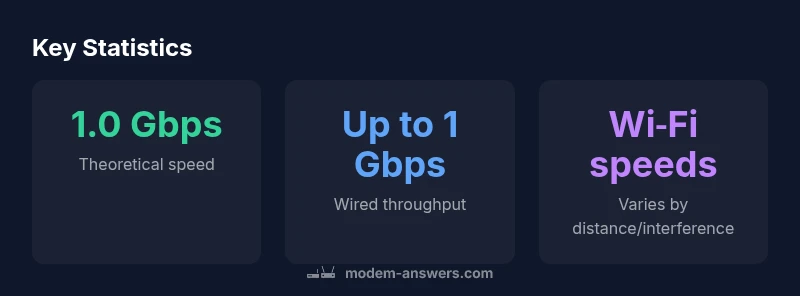
A 1,000 megabits-per-second connection is the gigabit target many households pursue. Yet the label alone doesn’t guarantee a constant 1 Gbps to every device. Real-world performance hinges on your service plan, network congestion, and the devices and cables you use. When readers ask what modem can handle 1000 mbps, the practical answer is that you need a device capable of the right DOCSIS standard and a solid local network link. According to Modem Answers, the crucial distinction is between the plan’s advertised speed and the actual throughput you observe at home. A modern modem that supports DOCSIS 3.1 (or higher) with a true gigabit Ethernet port forms the backbone of a gigabit-ready setup. Pair that with a quality router and good-quality cabling, and you’ll be well positioned to approach the 1 Gbps target on wired devices. Wi‑Fi speeds, by contrast, are usually lower than wired speeds, and protocol overhead further reduces sustained throughput. The takeaway: the modem choice matters, but it’s one piece of a broader network picture.
How Modems Deliver 1000 Mbps: The Technical Basics
Understanding how a modem translates your internet plan into usable data helps answer the question more clearly. The two most important factors are the DOCSIS standard and the Ethernet interface. DOCSIS 3.1 supports wider channel bonding and higher modulation, which makes gigabit speeds possible over many cable networks. DOCSIS 3.0 offered strong performance but can cap practical speeds on older networks. In practical terms, the modem’s job is to receive data over the coax, demodulate it, and pass it to your router through a fast Ethernet port. The Router then handles Wi‑Fi and local network traffic. The Modem Answers Team notes that even with a 1 Gbps-capable modem, you may not reach 1 Gbps if your provider’s end-to-end throughput is limited or if the wireless link between the router and devices is bottlenecked. Therefore, for the goal of 1000 Mbps, ensure the modem supports DOCSIS 3.1, offers at least a gigabit Ethernet port, and is compatible with your provider. The combination of a modern modem and an up-to-date router is essential to maximize performance.
What Modem Can Handle 1000 Mbps: Practical Guidelines
Guidelines to ensure your hardware is ready for gigabit speeds include targeting DOCSIS 3.1 or newer, checking the Ethernet interface, and avoiding older devices that bottleneck your network. Look for modems that advertise 1 Gbps Ethernet ports, and if you can, models that support 2.5 Gbps LAN or multi-gig WAN/LAN capabilities for future-proofing. If you prefer a gateway, choose one that combines a modem with a router but still supports gigabit wireless and wired throughput. The best value often comes from a DOCSIS 3.1 modem paired with a dedicated router; this separation lets you upgrade one component as needed without replacing the other. Also confirm that your chosen modem is listed on your provider’s compatible device list. The Modem Answers Team emphasizes the importance of real-world testing; a modem labeled as 1 Gbps or 2.0 Gbps only matters if your plan and the rest of the chain can support that throughput. Finally, remember that Wi‑Fi speed depends on distance, interference, and the number of devices connected.
Real-World Speeds: Common Pitfalls and How to Test
Many homes see speeds well below the plan’s advertised rate due to several factors. The distance from the router, construction materials, and other wireless interference can dramatically reduce wireless throughput. To isolate the issue, start with a wired test directly from the modem using a laptop or PC with a 1 Gbps NIC. Use a reliable speed test and run multiple tests at different times of day. Note that results will vary with VPNs, background apps, and other traffic. The Modem Answers analysis shows that wired testing often reveals whether the bottleneck is the modem/plan or the Wi‑Fi network. If wired results approach the plan’s limit but wireless performance lags, invest in a higher‑quality router or a Wi‑Fi 6 access point, and consider upgrading to a gateway with better wireless efficiency. If wired results are still far from the plan, contact your provider to verify that your modem is provisioned for the full 1 Gbps and that no outages or congestion are affecting service.
Choosing the Right Modem for Your Provider
Compatibility matters. Start by checking your provider’s approved device list and confirming the DOCSIS version the network supports in your area. Even if a modem is labeled as DOCSIS 3.1, it won’t help you reach 1000 Mbps if your provider caps throughput or uses a different system for service delivery. Reading user reviews can reveal real-world performance in similar neighborhoods. If you prefer to own your device, compare the upfront cost to the long‑term savings of renting from the provider. The provider’s customer service can also confirm whether a given model is fully provisioned for gigabit service. Remember: the right modem is essential, but your home network—the router, cabling, and Wi‑Fi setup—also needs to be up to the task.
Setup Tips to Get 1000 Mbps On Your Network
To maximize performance, assume a two‑part approach: reliable hardware and optimal configuration. Use Cat6 or better Ethernet cables for wired links to avoid crosstalk and support full gigabit throughput. Place the router and modem in a central location away from thick walls and metal obstacles; avoid stacking electronics that generate heat and radio interference. If you use a gateway, consider enabling bridge mode to bypass the router's own routing features and use a dedicated router instead for higher throughput and better wireless performance. When testing, always compare wired speeds before evaluating Wi‑Fi; if the wired baseline is strong but Wi‑Fi is weak, upgrade to a modern Wi‑Fi 6/6E access point or upgrade the router. Keep firmware updated and reboot devices if speeds drop unexpectedly; a simple restart can clear minor cache and channel bonding issues that reduce throughput.
Common Myths vs Realities
Several myths persist about gigabit speeds. The most common is that simply owning a 'gigabit modem' guarantees gigabit Wi‑Fi; the truth is that wireless performance will often lag behind wired speeds due to distance, interference, and standards. Another misconception is that DOCSIS 3.1 automatically fixes all speeds; in reality, the entire chain—from the provider’s network to the router—needs to handle the traffic. Finally, some assume that more expensive gear equals higher real-world speeds; while quality matters, proper configuration, placement, and compatibility play equally important roles. By focusing on the whole network rather than chasing a single device, you can maximize the likelihood of approaching 1000 Mbps, especially when the provider supports gigabit service.
Comparison of common modem types and their gigabit capabilities
| Model Type | Max Speed | Ethernet | Notes |
|---|---|---|---|
| DOCSIS 3.1 Cable Modem | Up to 1.2 Gbps | 1 Gbps | Best for gigabit plans with compatible router |
| DOCSIS 3.0 Cable Modem | Up to 1.0 Gbps | 1 Gbps | Solid option for entry-level gigabit plans |
| Gateway (Modem-Router) | Up to 1 Gbps (modem part) | Gigabit Ethernet | Convenient but may offer lower wireless range |
| Fiber Gateway (where applicable) | Depends on fiber network | N/A | For fiber networks, not a typical cable modem |
FAQ
Can any DOCSIS 3.0 modem deliver 1000 Mbps?
DOCSIS 3.0 modems can often reach around 1 Gbps in ideal conditions, but true gigabit speeds usually require a DOCSIS 3.1 modem with a reliable 1 Gbps Ethernet port and support from your provider.
Most people should use DOCSIS 3.1 for gigabit service.
Do I need a separate router to reach 1000 Mbps?
A separate, up-to-date router often yields better wireless and wired performance than a gateway alone. If you want the simplest setup, a high-quality gateway can work, but for peak gigabit speeds, use a dedicated modem and router.
Yes—pairing a good router with a strong modem generally improves speeds.
Will Wi‑Fi 6 always reach 1000 Mbps if my plan is gigabit?
Wi‑Fi 6 improves wireless speed and capacity, but actual throughput depends on distance, interference, and device count. Wired connections remain the most reliable path to 1000 Mbps.
Wi-Fi helps, but wired is the sure path to gigabit speeds.
How can I verify my modem works with gigabit service?
Check your provider’s approved device list, confirm DOCSIS version, and ensure the modem is provisioned for gigabit service. Contact support for confirmation of current provisioning.
Check the list and confirm provisioning with your provider.
Does 1000 Mbps mean I’ll always get 1000 Mbps?
No. Throughput is affected by network overhead, multiple users, and device capability. Expect less than the theoretical maximum, and optimize the setup to minimize bottlenecks.
Not always—real-world speeds vary with many factors.
What upgrade path helps if I’m far from gigabit speeds?
Upgrade to a DOCSIS 3.1 modem, ensure gigabit Ethernet, and improve Wi‑Fi with a modern router or access point. Verify firmware and consider bridge mode if using a gateway with a strong external router.
Upgrade both modem and router to maximize speeds.
“A gigabit home network hinges on the right combination of DOCSIS support, Ethernet throughput, and a clean wireless environment. The right modem can unlock the full potential of a 1000 Mbps plan.”
Key Takeaways
- Prioritize DOCSIS 3.1 with a gigabit Ethernet port.
- Pair with a separate, capable router for best results.
- Test wired speeds first to establish a baseline.
- Check provider compatibility and gigabit provisioning.
- The Modem Answers team recommends a measured upgrade path for best value.