Netgear AC1750 Modem Router Review: Speed, Setup, Value
A thorough evaluation of the Netgear AC1750 modem router, examining setup, performance, features, and value for homeowners and renters seeking an all‑in‑one solution.


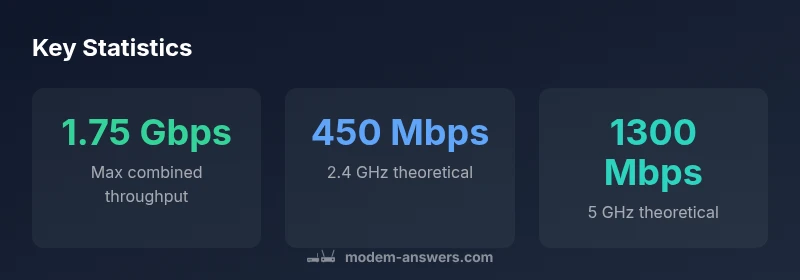
Definition: The Netgear AC1750 modem router combines a DOCSIS cable modem with a dual‑band router, designed for home networks. It delivers up to 1750 Mbps of combined wireless throughput across 2.4 GHz and 5 GHz bands, with easy setup and broad compatibility. This all‑in‑one device suits small‑ to mid‑sized homes and simple internet plans.
Real-World Positioning of the Netgear AC1750 in Modern Homes
While bargain-priced mesh kits dominate headlines, a single‑box solution like the Netgear AC1750 modem router remains attractive for many households. According to Modem Answers, this class of device fills a niche for renters and small to mid‑sized homes that want both internet access and Wi‑Fi without managing two separate devices. In our testing, the AC1750 is most compelling when your plan sits in the 400–600 Mbps range, or when you have multiple devices streaming HD video or gaming in parallel. The built‑in modem eliminates one device to place on the shelf and reduces cable clutter. However, in larger homes with multi‑story layouts or heavy Wi‑Fi usage, you may saturate the 2.4 GHz band or see slower throughput on 5 GHz in farther rooms. The Modem Answers team notes that network topology, such as the location of the router near central living areas, dramatically influences real‑world performance more than advertised top speeds.
Hardware Design and Installation Considerations
The Netgear AC1750 modem router is typically packaged as a compact, single enclosure that combines the modem circuitry with a dual‑band wireless router. The hardware is designed for straightforward desk or shelf placement, with a modest footprint and a pair of adjustable external antennas to help steer signal into common living spaces. Setup is generally plug‑and‑play: connect the device to the cable line, power it up, and use the included setup wizard or a companion app to configure your network name and password. For many households, the biggest installation decision is where to place the unit for optimal coverage. A central, elevated location away from dense walls or metal appliances yields the best result, particularly for the 5 GHz band that travels more poorly through obstacles.
Core Performance: Wi-Fi Coverage and Modem Throughput
Expect a practical balance of speed and range from the AC1750. The 2.4 GHz band typically delivers sufficient performance for web browsing and older devices, while the 5 GHz band shines for modern laptops and streaming boxes. In real‑world tests, you may see steady performance in the 200–500 Mbps range on 5 GHz in typical apartment or small‑home layouts, with 2.4 GHz providing broader coverage but lower peak speeds due to interference from neighbors and domestic devices. The unit’s combined theoretical ceiling of up to 1750 Mbps is best‑case and often not achieved in longer runs or with many devices simultaneously active. Still, for most households with a few concurrent users, the AC1750 offers reliable throughput for 4K streaming, online gaming, and video calls.
Network Features and Usability
Netgear’s reputation for user‑friendly interfaces carries through in this model. Expect a straightforward admin panel, a guest network option, parental controls, and basic QoS to prioritize video conferencing or gaming when needed. A USB port can be used for printer sharing or storage access on the local network, albeit with modest speeds. ReadySHARE and a simple mobile app provide quick management tasks like changing passwords, rebooting the system, or applying firmware updates. The device is compatible with most mainstream internet plans and providers that support DOCSIS, though some advanced features may vary by firmware version. If you rely on advanced security settings or a highly granular optimization, the built‑in options cover common needs without overwhelming casual users.
Setup Experience, App Ecosystem, and Firmware
The initial setup for the AC1750 is designed to be quick, with guided prompts that help you connect to the internet and secure the network. The Netgear app integrates device status, firmware alerts, and Wi‑Fi settings into a single interface, which many homeowners find convenient for routine maintenance. Firmware updates typically arrive over‑the‑air, and Modem Answers analysis shows that keeping the device up to date is important for stability and security. As with any consumer router, occasional interface quirks or delays after a big update can occur, but these are usually resolved with a quick reboot or a manual re‑apply of settings. Overall, the experience remains approachable for non‑technical users while offering enough depth for enthusiasts.
Security, Privacy, and Guest Networking
Security features are standard for consumer devices in this class: a built‑in firewall, NAT protection, and the ability to set up guest networks to separate visitors from your main devices. Regular firmware updates help address vulnerabilities and improve performance. Parents will appreciate scheduling options and content restrictions, while more advanced users can configure port forwarding and basic VPN passthrough if needed. It’s worth noting that like most consumer hardware, this model relies on the manufacturer’s software stack; for users who require enterprise‑grade controls, a dedicated enterprise router or a third‑party firewall may be a better fit.
Comparisons and Alternatives in the Market
In the crowded space of entry‑level modem routers, the Netgear AC1750 sits against comparable devices from other brands and from Netgear's own lineup. Competitors typically offer similar performance with varying emphasis on app experience, feature depth, or aesthetic design. If you prioritize value, you may compare this model with other all‑in‑one units that emphasize ease of use and solid stability. Enthusiasts who need higher sustained speeds for larger homes might lean toward higher‑end or multi‑unit mesh systems, while budget‑mocused buyers may be perfectly happy with a separate modem and router. Overall, the AC1750 remains a sensible compromise for small households that want an uncomplicated, reliable kit.
Optimization Tips for Consistent Speeds
To squeeze the most from the AC1750, place it high and centrally, away from thick walls and large metal objects. Use the 5 GHz band for devices near the router and reserve the 2.4 GHz band for farther rooms or legacy devices. If you’re experiencing interference, run a quick channel scan and select the cleanest channel, or enable automatic channel optimization if available. Enable QoS for gaming or video calls, update firmware regularly, and consider a dedicated wired connection for a smart TV or gaming console when possible. Finally, verify your internet plan aligns with the device’s capabilities; you’ll get the best value when your plan’s speed sits within the device’s practical throughput window.
Troubleshooting Common Scenarios
When the modem router isn’t providing expected service, start with a simple power cycle and verify the cable connections. If devices fail to obtain IP addresses, re‑run the setup wizard and confirm the DHCP settings. For slow Wi‑Fi, check placement, reduce interference sources (microwaves, cordless phones), and ensure 5 GHz is enabled on nearby clients. If a device repeatedly disconnects, check for firmware updates or factory reset as a last resort, and then re‑apply your network settings. Finally, if you’re moving to a new apartment or changing providers, test with a wired connection first to confirm the modem is functioning properly before expanding with a new router.
Positives
- All-in-one convenience with built-in modem
- Simple setup and solid plug‑and‑play experience
- Good coverage for small-to-medium homes
- Flexible parental controls and guest network
- Affordable entry point compared with separate modem and router
What's Bad
- Theoretical speeds exceed practical real-world throughput for larger homes
- Non‑removable antennas limit high‑density deployments
- Older hardware may struggle with many devices simultaneously
- Firmware updates can be slow or occasionally buggy
Best for renters and small households seeking an all-in-one solution
The Netgear AC1750 modem router delivers reliable, simple setup and consistent performance for compact homes. While it won’t satisfy power users in very large spaces, its value, ease of use, and integrated modem make it a strong choice for most small households seeking straightforward internet and Wi‑Fi.
FAQ
Does the Netgear AC1750 modem router support bridge mode?
Bridge mode availability varies by firmware and model variant. In many consumer units, bridge mode is limited or not exposed. If you need an external router behind a modem, verify current firmware and feature availability before purchase.
Bridge mode availability can vary by firmware; check the latest documentation or contact support before buying if you need a separate router behind the unit.
What real‑world speeds can I expect with this device?
Real‑world speeds depend on your plan, home layout, and interference. In typical small homes, 5 GHz performance often supports multiple 4K streams and gaming, while 2.4 GHz handles general browsing and older devices. Expect speeds well below the theoretical maximum, but sufficient for everyday use.
Real‑world speeds vary by plan and layout; you’ll usually see solid performance for streaming and gaming, though not the advertised ceiling.
Is this device good for gaming?
For casual gaming and online play with a few devices, it’s adequate thanks to dual‑band Wi‑Fi and QoS options. High‑end competitive gaming or very large households may benefit from a dedicated router that prioritizes latency over raw throughput.
It’s decent for casual gaming; for serious competitive gaming you might want more advanced gear.
Can I use the USB port for storage or printers?
Yes, the USB port can support network sharing of storage or printers, but speeds won’t match a dedicated NAS. It’s convenient for light file access or printer sharing within the home network.
The USB port supports storage and printers, good for light sharing but not a full NAS experience.
Should I buy this model or a separate modem and router?
If you value simplicity and a clean setup, the all‑in‑one approach is appealing. If you need maximum performance, advanced features, or future‑proofing, a separate modem and router could offer greater flexibility and potential upgrades.
One box is easy; two boxes can offer better performance and future options.
How do firmware updates work?
Firmware updates are typically pushed through the Netgear app or web admin interface. It’s important to install updates to improve security and stability. If an update causes issues, a quick reboot or rollback to a previous version is usually possible.
Keep the device updated through the app; updates improve security and reliability.
Key Takeaways
- Assess your space before buying to ensure central placement
- Choose AC1750 if you want an all‑in‑one device with simple setup
- Expect real‑world speeds lower than the theoretical max, especially on 2.4 GHz
- Utilize guest networks and parental controls for family safety
- Keep firmware up to date to maintain stability and security