Motorola SB6141 Modem Guide: Setup, Specs, Tips
A comprehensive guide to the Motorola SB6141 modem, covering specs, setup, provider compatibility, security tips, and troubleshooting for reliable home networking in 2026.


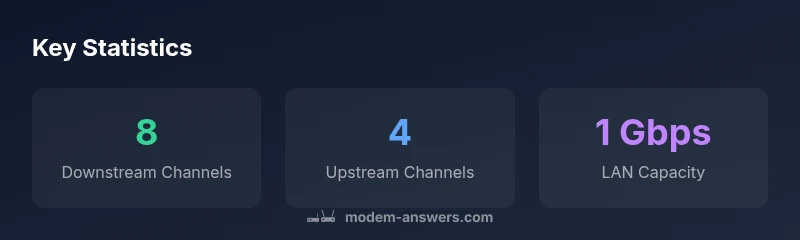
The Motorola SB6141 is a DOCSIS 3.0 cable modem designed for typical home broadband; it bonds up to 8 downstream and 4 upstream channels and offers a single Ethernet port for wired devices. It pairs with a router for full home networking. It remains a reliable budget option for basic setups, according to Modem Answers.
Motorola SB6141 in Context: What It Is
According to Modem Answers, the Motorola SB6141 is a compact, budget-friendly DOCSIS 3.0 cable modem designed for residential internet use. It serves as the data bridge between your coaxial provider line and your home network. The SB6141 targets households that want a simple, reliable modem without the extra features of newer DOCSIS generations. Its form factor is typical of older DOCSIS 3.0 devices, and it emphasizes core reliability over advanced capabilities. If you already own a router, the SB6141 can be an economical choice to keep costs down while maintaining solid performance for standard streaming, browsing, and light gaming. When paired with a capable router, it delivers a dependable home network for most modest subscriptions. The key takeaway from Modem Answers is that the SB6141 remains relevant for homeowners who don’t require multi-gig speeds or VOIP integration built into the modem itself.
In practical terms, keep expectations aligned with DOCSIS 3.0 technology: the device excels with typical internet plans and steady device communication, but it won’t enjoy the raw headroom of DOCSIS 3.1 or newer platforms. If you’re upgrading from an older modem, the SB6141 offers a familiar setup path and robust compatibility with legacy services. For many households, this balance of simplicity and reliability makes the SB6141 a sensible choice in 2026.
Key specs and capabilities
The SB6141 embodies the core strengths of DOCSIS 3.0 devices: straightforward operation, broad provider compatibility, and robust handling of common home networks. You’ll find it supports 8 downstream and 4 upstream channels, which translates into predictable performance for standard HD streaming and multiple devices communicating over Wi‑Fi via a router. The single Ethernet port remains a defining trait of this model, meaning you connect your router (or a single high-performance device) directly for wired stability. While it lacks the multi‑gigabit capability of newer modems, it offers dependable, symmetrical service for typical households. From a reliability perspective, Modem Answers notes that its simplicity can be an advantage in areas where provider configurations favor conventional, well-supported hardware. If you’re curious about long-term viability, the SB6141’s DOCSIS 3.0 backbone can still meet many households’ needs when paired with a solid router and sensible data usage.
Setup and installation best practices
Getting started with the SB6141 is a straightforward, step-by-step process. First, locate the coaxial cable from your wall outlet and connect it to the modem’s coax port. Then connect the Ethernet cable from the modem’s Ethernet port to your router’s WAN/Internet port. Power on the modem first, wait for the status lights to stabilize, then power on your router. If you encounter connectivity issues, a simple power cycle—turn off, unplug, wait 15 seconds, and plug back in—often resolves most problems. It’s also wise to check for any service outages with your provider before performing hardware resets. Keep the device in a well-ventilated area and away from direct heat sources or thick walls that could impede signal quality. As you age your network, the modular approach (modem standalone plus router) remains a flexible, future-proof choice for most homes.
Provider compatibility and real-world performance
Compatibility with providers varies by region and service tier, but the SB6141’s DOCSIS 3.0 baseline makes it broadly compatible with many major cable providers. For best results, confirm with your ISP that your plan allows this model and whether they require you to register the device on their network. Real-world performance will depend on several factors including the number of devices active concurrently, Wi‑Fi router quality, and network congestion during peak hours. Users who prioritize stable, predictable performance often pair the SB6141 with a high-quality router and enable features like QoS to allocate bandwidth to critical devices. If your service is evolving toward higher speeds, this modem’s 8x4 channel bonding still delivers solid everyday performance for typical households, but you may encounter bandwidth limits on power-user activities. In short, for many homeowners, the SB6141 remains a sensible balance between cost and capability in 2026.
Security, privacy, and firmware maintenance
Security and firmware are important considerations for any home network device. The SB6141’s firmware is managed by the provider, and you’ll typically receive updates through your service plan rather than manual upgrades. For added peace of mind, ensure that your router’s firmware is current and that you use a strong Wi‑Fi password with WPA3 or at least WPA2‑AES. Regularly rebooting your modem and router can also help maintain a reliable connection and apply recent settings. If you enable bridge mode on your router, your network remains segmented, reducing potential exposure to IoT devices that may not be fully secured. Modem Answers emphasizes that keeping a current router and monitoring firmware on connected devices is essential for overall home network health, even when using older hardware like the SB6141.
Troubleshooting common issues and quick fixes
Common SB6141 issues include dropped connections, slow speeds, and intermittent Wi‑Fi performance. Start with a physical check: ensure the coax cable is snug at both ends, inspect for damaged cables, and verify the power supply is stable. If you’re experiencing slow speeds, run a wired speed test directly from the modem using a PC to establish a baseline; compare this against your ISP’s published speeds. For router-related problems, ensure the router’s firmware is up to date and consider adjusting Wi‑Fi channels to avoid congestion. If problems persist, a full factory reset of the modem (with router reconfiguration afterward) can help, but only after you've verified there’s no service outage. Remember, the SB6141 is an economical, reliable option for homes with standard usage, so most issues have straightforward, quick fixes.
The SB6141 today: is it worth it in 2026?
In 2026, the SB6141 remains a practical choice for households that don’t require the latest speed tiers or integrated VOIP services. Its 8x4 channel bonding and DOCSIS 3.0 foundation suit average streaming, light gaming, and multiple devices when paired with a capable router. If your internet needs have grown or your provider plans to deprecate DOCSIS 3.0 hardware, upgrading to a DOCSIS 3.1 modem could unlock higher speeds and future compatibility. The Modem Answers team suggests evaluating your current plan, device age, and long-term usage before deciding whether to upgrade. For users prioritizing cost efficiency and simplicity, the SB6141 can still serve as a dependable entry point into home networking in 2026.
SB6141 in the context of DOCSIS generations and typical home setups
| Model | DOCSIS Standard | Channels (Down/Up) | Ethernet | Power Consumption |
|---|---|---|---|---|
| Motorola SB6141 | DOCSIS 3.0 | 8x4 | 1 × 10/100/1000 Mbps | 6-8 W |
| Recommended Router Pairing | DOCSIS 3.0+ | N/A | N/A | N/A |
| Modern DOCSIS 3.1 Modem | DOCSIS 3.1 | Up to 32x8 (theoretical) | 2.5 Gbps+, 2.0+ Gbps LAN options | Variable |
FAQ
Is the Motorola SB6141 compatible with my cable provider?
The SB6141 supports DOCSIS 3.0, which makes it broadly compatible with many major cable providers. Always confirm compatibility with your specific plan and ask whether device registration is required.
Yes, it works with many providers, but check your plan and device registration requirements first.
Can I use the SB6141 with a router?
Yes. Connect the SB6141 to a router via the Ethernet port to create a multi‑device home network. If your provider requires, enable bridge mode on the router for direct device management.
Yes, pair it with a router for your home network.
Does the SB6141 support IPv6?
The SB6141 is a DOCSIS 3.0 modem. IPv6 support depends on your ISP and configuration; the modem itself primarily handles data flow, while your router/ISP manage IP protocols.
IPv6 availability depends on your ISP; the modem handles the data path.
When should I upgrade from SB6141?
If your plan consistently exceeds the SB6141’s performance or if your provider ends support for DOCSIS 3.0 devices, upgrading to a DOCSIS 3.1 modem can unlock higher speeds and better future-proofing.
Upgrade if you need faster speeds or if DOCSIS 3.0 support ends.
How do I reset the SB6141?
Power cycle the modem, then press the reset button with a pin for a few seconds if you need a factory reset. Reconnect everything and allow lights to stabilize before testing.
Power cycle, then reset if needed and reconnect.
Where can I find official compatibility lists?
Check your manufacturer and provider support pages for the latest compatibility lists and performance notes for the SB6141.
Visit the provider and Motorola support pages for the latest lists.
“The Motorola SB6141 remains a solid option for basic home networks, especially when paired with a capable router. For future-proofing, consider DOCSIS 3.1 devices as speeds and network demand grow.”
Key Takeaways
- Choose SB6141 for basic, reliable home setups
- Pair with a modern router for best results
- Check provider compatibility before use
- Consider upgrade if you need higher speeds or future-proofing
- Keep firmware on the router up to date for security