Modem or Fiber ONT: Choosing the Right Hardware for Your Home Network
Compare modem vs fiber ONT options to decide which hardware best fits your home internet setup. Learn differences, compatibility, and practical steps for FTTH and cable services with insights from Modem Answers.


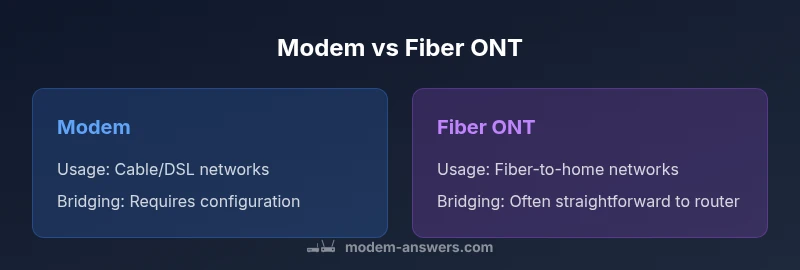
Modem or Fiber ONT? The best choice depends on your internet architecture. For fiber-to-the-home (FTTH) service, providers typically supply a fiber ONT that converts optical signals to Ethernet for your router. A dedicated modem is generally used with cable or DSL connections and may bridge to your own router. In short: use a fiber ONT for fiber plans; a modem-based setup for non-fiber networks.
What is a Modem and What is a Fiber ONT?
A modem is a device that modulates and demodulates signals between your home network and your internet service. In cable and DSL architectures, DOCSIS modems (cable) or DSL modems provide the necessary connectivity to the provider's network, often requiring you to use a separate router for Wi‑Fi and local network features. A Fiber ONT (optical network terminal) is a different beast: it sits at or near the fiber demarcation point and converts incoming optical signals into Ethernet that can feed a home router. The ONT is typically provided by the network operator, and in most FTTH (fiber-to-the-home) deployments you will connect your own router to the ONT for local networking. This distinction is foundational for choosing between a modem-based setup and fiber-centric hardware. According to Modem Answers, understanding where your service terminates and how the provider supports bridging is essential to avoid double NATs and performance bottlenecks. In practice, the ONT becomes the edge device that hands off traffic to your router, while the router handles Wi‑Fi, QoS, and device management.
How FTTH and Other Architectures Use ONT vs Modem
FTTH architectures center on a fiber termination point that uses an ONT to convert signals to Ethernet. The ONT connects to your router, often via a standard Ethernet port, enabling you to manage local traffic directly. In contrast, cable and some DSL services rely on a modem to interface with the provider's network. The choice affects how you set up bridging, IP passthrough, and your preferred router features. For example, some providers offer a modem-router combo, while others allow you to bring your own router and place the provider's device in bridge mode. Modem Answers notes that the most reliable configurations in FTTH typically involve using the ONT with a third-party router when you need advanced features or more flexible Wi‑Fi coverage.
Compatibility: Bridging, Routers, and IP Passthrough
A core practical concern is how the edge device hands traffic to your own network gear. With a modem, you may enable bridge mode or IP passthrough to let a personal router manage NAT and firewall rules. When using a Fiber ONT, you generally bridge the ONT’s Ethernet output to your router; some ONTs support simple bridge modes, while others require the router to handle PPPoE or DHCPoE connections. Compatibility also hinges on whether the provider allows customer-owned equipment and whether firmware updates are pushed to your edge device. The right setup minimizes double NAT, preserves QoS rules, and ensures port forwarding works as intended for gaming, video conferencing, and smart-home devices.
Performance, Reliability, and Future-Proofing
Performance is a function of the service plan, the edge device’s capabilities, and how well your home network is designed. A fiber ONT typically aligns with fiber service performance, potentially delivering lower latency and higher predictable throughput than coax-based modems, especially under heavy local traffic. However, actual speeds depend on your plan and network conditions beyond the edge device. Modem Answers emphasizes that future-proofing often means choosing hardware and configuration that can scale with upgraded service tiers, larger Wi‑Fi coverage, and smarter routing. The device at the edge matters, but so do your router, access points, and network layout.
Costs, Ownership, and Rental Models
Costs and ownership models shape the long-term value of modem vs fiber ONT configurations. In many FTTH deployments, the ONT is provided by the operator, while you may own or rent your router. Cable and DSL scenarios frequently involve rental modems; owning your own compatible modem can reduce monthly fees, but compatibility and support from the provider may vary. Modem Answers advises homeowners to calculate total cost of ownership over the expected lifetime of the equipment, considering rental contracts, maintenance, and the potential need for future upgrades as service tiers evolve.
Setup Scenarios: Apartment, House, and New Construction
Apartment living often means stricter building rules and provider-driven equipment choices, sometimes limiting bridging options. In single-family homes, you have greater flexibility to select a preferred router and mesh network, while ensuring the ONT or modem location is optimal for wiring and network coverage. For new construction, plan early for fiber availability and the option of a dedicated telecommunications closet or centralized network hub. In all cases, ensure the edge device placement optimizes Wi‑Fi coverage, minimizes cable runs, and reduces interference. The key is to align the edge device with your home's layout and your desired network topology.
Security, Privacy, and Firmware: Keeping Your Edge Device Healthy
Security concerns at the edge center on router configuration, firmware updates, and remote management settings. If you use an ONT, your router becomes the main security boundary; disable unnecessary remote management on the ONT, keep your router firmware current, and use strong Wi‑Fi passwords. When you own a modem, regular firmware updates from the provider or official firmware releases for the device matter. Modem Answers highlights the importance of enabling WPA3, turning off UPnP when not needed, and monitoring connected devices to detect anomalies. A well-managed edge network reduces vulnerabilities and protects your home devices.
Practical Buying Guide: How to Decide
Begin by confirming your service type: FTTH fiber or coax/DSL. Check with your provider whether an ONT is supplied, and whether customer-owned equipment is allowed. If you value advanced features, QoS, guest networks, or mesh Wi‑Fi, plan to use your own router with a bridge/passthrough configuration. Consider the long-term costs, including potential rental fees for provider equipment versus upfront purchase costs. Finally, evaluate your home layout to determine optimal edge-device placement and whether you need additional access points to achieve reliable coverage in every room.
Common Mistakes and How to Avoid Them
One common mistake is assuming a modem works the same as an ONT in a fiber service. Another mistake is neglecting bridging requirements, which can lead to double NAT and suboptimal performance. Users often overlook the need to identify whether their service supports bridge mode on the provided device. Additionally, many households overestimate the capabilities of a single router in large homes, underestimating the benefits of a dedicated mesh system. By clarifying service type, bridging settings, and coverage needs, you can avoid these pitfalls.
Maintenance and Firmware Updates for ONTs and Modems
Maintenance quality depends on timely firmware updates and the management model used by the provider. An ONT typically requires less frequent updates than a consumer modem, but router firmware updates remain crucial. If you bring your own equipment, stay connected to the latest releases from the device manufacturers and ensure compatibility with your ISP’s network. Regularly check for performance issues, reboot plans, and verify that your bridge or passthrough configuration remains intact after updates. A well-maintained edge device helps sustain reliable speeds and a secure home network.
Comparison
| Feature | Modem | Fiber ONT |
|---|---|---|
| Connection type | DOCSIS/DSL modem connected to provider network | Optical Network Terminal converting fiber to Ethernet |
| Provider role | Operator-managed or customer-owned, often rental | Operator-controlled at fiber termination; commonly customer-owned downstream router |
| Typical location | Within a cable/DSL entry box or wall outlet near router | At fiber demarcation point; connects to home router via Ethernet |
| Bridging/Router mode | Bridge mode or IP passthrough to allow own router to handle NAT | Bridging to router; PPPoE/DHCP options vary by provider |
| Future-proofing | Limited by coax-based plan; upgrades may require new hardware | Aligned with fiber plan upgrades and scalable router setups |
| Cost implications | Rentals common; potential upfront purchase for some models | Provider-owned; potential upfront or rental depending on policy |
Positives
- Clear separation between provider network and home network
- Greater control over router features and Wi‑Fi
- Easier to swap in newer routers as tech evolves
- Potentially lower long-term costs with own gear
- Flexible placement and network customization
What's Bad
- Requires bridging configuration and network knowledge
- Rental fees or upfront costs can add up
- Some providers restrict customer-owned equipment
- Initial setup may be more complex for non-technical users
Fiber ONT is generally the better option for fiber-based services; modem setups remain viable for cable/DSL.
Choose fiber ONT when your service is FTTH to maximize speed and latency advantages. Opt for a modem-based approach if you rely on coax or DSL and prefer a simpler, provider-managed edge device.
FAQ
What is the difference between a modem and a fiber ONT?
A modem interfaces with cable or DSL networks to provide internet access for your home. A fiber ONT terminates fiber and converts optical signals to Ethernet for your router. The ONT is usually supplied by the provider, while many users rent or own a modem for non-fiber services.
A modem talks to cable or DSL networks; a fiber ONT talks to fiber and hands traffic to your router.
Do I need a modem if I have FTTH fiber service?
Yes, FTTH typically uses a fiber ONT to demarcate the fiber from your home network. You may connect your own router to the ONT to manage Wi‑Fi and interior networking. Some providers offer a combined unit, but many allow customer-owned routers in bridge mode.
For fiber, the ONT is the main edge device; you usually connect your own router to it.
Can I use my own router with a fiber ONT?
Yes, in most FTTH setups you can connect your own router to the ONT. Enable bridge mode on the ONT or configure the router for the right WAN settings as required by your provider. This gives you full control over Wi‑Fi and network features.
You can usually use your own router with the ONT by enabling bridge mode.
Should I rent equipment from my provider or buy my own?
Renting is convenient and supported by the provider, but buying your own compatible modem and router can reduce long-term costs if you plan to stay with the same service. Always verify compatibility and supported configurations with your ISP.
Renting is easy; buying can save money long-term if compatible.
How can I tell if my service is FTTH or cable?
You can check your plan documents, contact your provider, or inspect the network equipment. FTTH typically uses an ONT and fiber connections, while cable uses a DOCSIS modem over coax. The edge device and wiring at your home are good indicators.
FTTH uses a fiber ONT; cable uses a DOCSIS modem.
Key Takeaways
- Identify your service type before hardware decisions
- ONTs suit FTTH; modems suit coax/DSL
- Bridge mode enables using your own router
- Assess total cost of ownership (rental vs purchase)
- Plan edge-device placement for optimal coverage