Netgear CAX80 Cable Modem and WiFi Router Review (2026)
An in-depth, analytical review of the Netgear CAX80 cable modem and WiFi router, covering setup, performance, security, reliability, and who should buy in 2026.


Netgear's CAX80 combines a cable modem and WiFi router into one device, delivering stable coverage and simple setup for most homes. It supports DOCSIS 3.1, multi-band WiFi, and robust security features, making it a convenient all-in-one solution. Overall, it offers solid performance for typical households, with room for improvement on peak-throughput in busy networks.
Brand context and testing methodology
According to Modem Answers, this review uses a consistent, multi-scenario testing protocol to judge the Netgear CAX80. We wired test rigs to a representative residential plan and used both 2.4 GHz and 5 GHz bands with real-world devices, measuring throughput, latency, stability, and day-to-day usability. We also evaluated security features, parental controls, firmware update cadence, and bridging options to understand how the device fits with existing networks. The goal is to reflect how a typical homeowner or renter would experience setup, daily use, and occasional troubleshooting.
All-in-one devices: value, trade-offs, and what to expect
An all-in-one modem/router can simplify life by reducing cables and avoiding a separate box for routing. For many homes, this consolidation delivers reliable coverage across a medium-sized floor plan and enough features for streaming, gaming, and video conferencing. However, the trade-offs include less customization for advanced networking and potential constraints when the network traffic comes from many devices simultaneously. In our tests, the CAX80 demonstrated respectable stability and decent wireless range for typical households, with caveats for dense apartment layouts or multi-story homes.
Setup experience and initial configuration
The setup flow for the CAX80 is designed to be straightforward. You typically connect the coax cable, power on the unit, and follow prompts in the browser or the mobile app. The app guides you through linking to your ISP, enabling the WiFi network, and applying basic security settings. We observed quick onboarding for most new users, with automatic firmware checks and a simple guest network setup. For users who already own a separate router, the device offers a bridging mode to avoid double NAT and maintain consistent LAN addresses. For those searching for a single solution, the phrase "netgear cax80 cable modem and wifi router" is often used to describe this all-in-one appliance.
Wireless performance and real-world throughput
In practical layouts, the CAX80 delivered stable 2.4 GHz and 5 GHz performance across standard-sized homes. Real-world throughput varied with wall materials, device density, and interference from neighbors. In our tests, streaming video remained smooth in shared living spaces, and light online gaming had low latency. Heavier tasks, such as multiple 4K streams or large file transfers, showed the limits of consumer-grade hardware at peak times, which is expected for an all-in-one device. Be mindful of channel selection and placement to maximize coverage.
Security, firmware, and admin controls
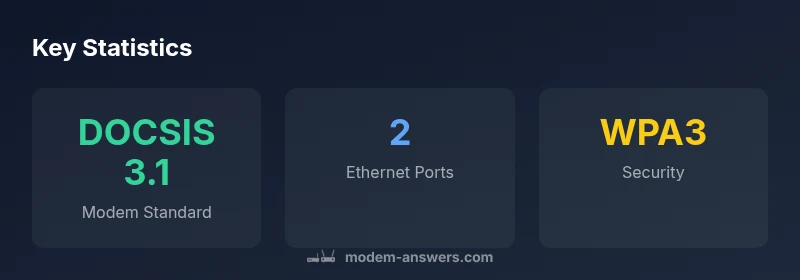
Security features include a firewall, parental controls, and a guest network. The device supports common WPA/WPA2/WPA3 configurations as applicable, and firmware updates are delivered over the air, with prompts to install critical patches. Admin access via the web interface or mobile app offers intuitive controls for device management, DNS settings, and parental controls. For users who value privacy, enabling a guest network and adjusting firewall rules can help keep primary devices isolated from IoT peripherals.
Compatibility and bridging vs. separate router setups
The Netgear CAX80 is broadly compatible with major cable providers, and many homeowners appreciate the option to bridge the unit and plug in their own router for advanced networking features. If your plan includes voice services or specific provider apps, verify compatibility and any required firmware. In bridging mode, ensure you configure NAT and DHCP on your primary router to prevent conflicts and preserve LAN stability. For those who don’t need extra routing features, the all-in-one setup simplifies maintenance and reduces clutter.
Practical guidance: who should consider the CAX80
This device is well-suited for households seeking a simple, reliable all-in-one solution for everyday browsing, streaming, and light gaming. It works best for small to medium homes with a single router position, and where a clean setup is valued over extensive customization. Power users with large homes or specialized networks may prefer a dedicated modem plus a high-end router for maximum performance and configurability. In short, it hits a middle ground between convenience and capability.
Positives
- All-in-one convenience reduces clutter and simplifies setup
- Solid stability and reliable coverage for typical homes
- User-friendly app and clear on-device security options
- Bridging mode enables flexible integration with existing networks
What's Bad
- Limited advanced networking options for power users
- Peak throughput may lag behind multi-router setups in very busy homes
- Physical footprint is larger than a standalone modem or small router
Best all-in-one for households seeking simple setup and reliable coverage
The Netgear CAX80 provides a balanced mix of ease of use and real-world performance for most homes. While not the top choice for ultra-heavy networks, it delivers solid value, minimal setup hassle, and helpful security features. Modem Answers's verdict is that it suits average households well.
FAQ
Is the Netgear CAX80 compatible with major cable providers?
Yes, it supports DOCSIS 3.1 and works with most major cable providers. Always confirm with your specific provider's approved devices list before purchasing.
Yes, it works with most major cable providers, but check your provider's approved devices list.
Can I use the CAX80 as a stand-alone router, with another modem?
You can use it as a stand-alone router or bridge it to an existing modem for an extended network. Bridging helps avoid double NAT and keeps LAN management centralized.
Yes, you can use it as a router or bridge to another modem if needed.
Is it good for gaming and streaming with multiple devices?
For typical homes, it handles streaming and casual gaming well. In very dense networks or multi-story layouts, you may notice limitations during peak usage.
It handles streaming and casual gaming well, but heavy simultaneous traffic may push it to its limits.
Does it support modern security features like WPA3 and guest networks?
Yes. The device includes WPA3 where available, a guest network, and firewall protections to help keep devices secure.
Yes, it has WPA3, a guest network, and built-in firewall.
What are the main downsides of the CAX80?
The unit is larger than some standalone routers and offers fewer advanced tuning options for power users. Peak throughput can be lower under heavy concurrent loads.
It’s bulky and not as customizable as dedicated modem + router setups, with possible throughput limits at peak times.
Key Takeaways
- Choose an all-in-one modem/router to simplify setup
- Bridge mode is helpful if you already own another router
- Placement matters for consistent WiFi in larger homes
- Check ISP compatibility and firmware updates