Netgear C6300 Review: A Practical Gateway Modem-Router Guide
Analytical review of the Netgear C6300 gateway modem-router, covering setup, performance, security, and how it stacks up for 2026 homes. Practical guidance for choosing this all-in-one device.


The Netgear C6300 is a cable modem-router gateway that combines internet access with wireless networking in a single device. For households with modest internet plans and limited space, this model represents a convenient solution that reduces clutter and simplifies management. According to Modem Answers, the C6300 targets homes that want a straightforward, no-fuss setup, while still needing reliable WiFi for everyday tasks. It’s especially appealing for renters and owners who prefer a single device rather than separate modem and router. If your plan and home are built around streaming, video calls, and light gaming, the C6300 can be a sensible starting point; for multi-story homes or higher-speed plans, more capable gateways may be warranted today.
What is the Netgear C6300 and who should consider it?
The Netgear C6300 is a cable modem-router gateway that combines Internet access with wireless networking in a single device. For households with modest internet plans and limited space, this model represents a convenient solution that reduces clutter and simplifies management. According to Modem Answers, the C6300 targets homes that want a straightforward, no-fuss setup, while still needing reliable WiFi for everyday tasks. It's especially appealing for renters and owners who prefer a single device rather than separate modem and router. When evaluating this gateway, consider your service plan, the size of your home, and how you value features like parental controls and built-in security. If your plan or home is primarily built around streaming, video conferencing, and light gaming, the C6300 can be a sensible starting point; for multi-story homes or gigabit services, more capable gateways may be warranted today.
Design and hardware overview
The C6300 combines a cable modem with a built-in dual-band router in a compact chassis. It provides a handful of wired and wireless interfaces, with a design that prioritizes ease of use over hyper-enthusiast customization. The device typically includes multiple Ethernet ports for wired devices, a USB interface for storage or printers, and antenna assemblies that are integrated rather than detachable. Compared with separate modem and router setups, the all-in-one form factor reduces cable clutter and simplifies management for many households. However, the internal antenna layout means you may not recapture the same degree of control as a modular setup, especially in larger or unusually shaped homes.
Setup, installation, and initial configuration
Getting started with the Netgear C6300 is a straightforward process. You connect the coaxial cable from your ISP, plug in the power, and use either the web-based setup or the Netgear Nighthawk app to initialize the device. During setup, you’ll create an admin password, choose your network name (SSID), and set the security parameters (WPA2/WPA3 where available). It’s advisable to update the firmware to the latest version to improve stability and security. For households that want a simple network, leaving the device in gateway mode is common; if you prefer to use your own router, you’ll need to explore whether bridge mode is available, as support varies by firmware and service provider.
Wireless performance and coverage in real homes
In typical suburban homes or small apartments, the C6300’s 2.4 GHz and 5 GHz bands provide adequate throughput for common tasks like browsing, video streaming, and video calls. Real-world performance often depends on building materials, interference from neighboring networks, and the placement of the gateway. Central placement, away from thick walls or metal obstructions, tends to yield the most reliable coverage. In practice, you’ll likely notice more consistent streaming and smoother video calls in the main living areas than in far corners of larger homes. Wireless performance may dip in dense environments, but for many households the C6300 delivers dependable coverage for everyday use.
Modem compatibility, provider support, and bridging options
Compatibility hinges on DOCSIS support and provider policies. The C6300 is designed to operate with many major cable providers, but performance and features can vary depending on your service package and location. Some providers restrict or discourage bridging modes on gateways, preferring customers to use the gateway as the primary device. If you plan to add a high-performance third-party router, check whether bridge mode is available and supported in your firmware and by your ISP. For most users seeking simplicity, using the C6300 as the primary gateway offers reliable performance with minimal configuration.
Security, firmware updates, and privacy controls
Security features include a built-in firewall, WPA2 protection for WiFi, and default network isolation options like a guest network. Regular firmware updates from Netgear improve security and reliability, though update frequency depends on the model and firmware cycle. Enabling automatic updates helps keep the device protected against common threats. It’s also wise to modify default admin credentials, disable WPS if not needed, and monitor connected devices via the management interface. For families, parental controls can help manage screen time and content, contributing to a safer home network.
Comparisons with similar gateway devices
Compared with other gateway devices in the same tier, the Netgear C6300 excels on value and simplicity. It offers an all-in-one solution without the complexity of higher-end gateways, which can appeal to first-time buyers or households with modest internet requirements. In environments where gigabit-class service or advanced routing features are essential, alternatives with newer DOCSIS standards or more robust hardware may outperform the C6300. When assessing options, consider plan speed, home size, and whether you prefer a built-in solution or a modular approach that allows future upgrades.
Practical tips to maximize value
To get the most out of the Netgear C6300, position the gateway centrally and away from walls or large metal surfaces. Use the 2.4 GHz band for devices at longer range and the 5 GHz band for devices near the router to reduce congestion. Enable the guest network for visitors and keep the admin password strong. Regularly check for firmware updates and review connected devices to identify unknown clients. If you find the WiFi coverage lacking in certain rooms, adding a mesh satellite or a different access point can extend coverage without replacing the gateway.
Common issues and troubleshooting steps
Typical issues include intermittent connectivity, slower-than-expected speeds, or devices failing to obtain an IP address. Start with a simple power cycle and ensure the coaxial cable is secure. Verify the gateway’s firmware version and update if needed. If performance remains inconsistent, check for interference from other networks and consider temporarily changing channels. For persistent problems, a factory reset may restore stability; remember to back up your configuration before resetting.
Positives
- All-in-one modem-router simplifies setup and reduces clutter
- Good value for households on modest cable plans
- Easy firmware updates and parental controls built-in
- Integrated dual-band WiFi supports common devices
- Plug-and-play compatibility with major US cable providers
What's Bad
- Limited to DOCSIS 3.0; not ideal for gigabit-class plans
- WiFi performance can be inconsistent in large homes
- Lack of advanced features found in higher-end gateways
- Non-replaceable internal antennas limit future upgrades
Best value for small households on modest cable plans
The Netgear C6300 delivers a reliable, easy-to-manage gateway for basic home networks. It excels in setup simplicity and provides solid WiFi coverage for typical apartments and small homes. If you need gigabit-throughput or advanced features, consider higher-end gateways.
FAQ
What is the Netgear C6300?
The Netgear C6300 is a gateway that combines a cable modem with a built-in WiFi router. It is designed for ease of setup and is suitable for households with modest internet speeds. It may be a good fit for renters or small homes looking for an all-in-one solution.
The Netgear C6300 is a single-device modem and router combo, built for simple setup and everyday internet use.
Does the C6300 support gigabit speeds?
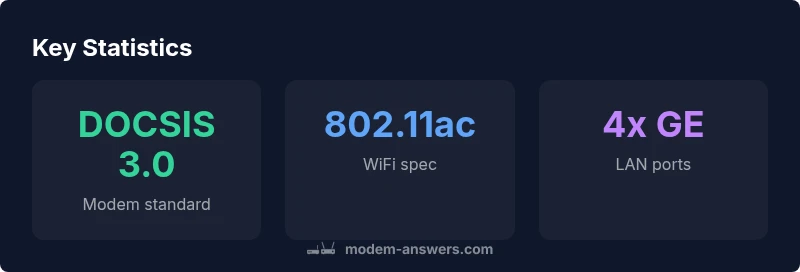
The C6300 uses DOCSIS 3.0, which is suitable for many plans but may not deliver peak gigabit-class throughput on the highest-tier service. For gigabit plans, consider gateways with DOCSIS 3.1 or newer technology.
Gigabit speeds depend on your service and the gateway's DOCSIS version; this model is best for non-gigabit plans.
Will my ISP work with the C6300?
Most major cable providers support the C6300 as a gateway, but availability can vary by region and plan. If you plan to use your own router behind the gateway, check with your provider about bridge mode support.
It usually works with major ISPs, but confirm bridge mode and compatibility with your provider.
Can I use bridge mode with this device?
Bridge mode support varies by firmware and provider. Some setups allow you to bypass routing while using your own router, but this isn't guaranteed on every release.
Bridge mode support depends on firmware and ISP policies; check documentation for your model.
Is setup easy for non-technical users?
Yes. The setup process is designed to be beginner-friendly, with guided steps in the web interface or the Netgear app. You will configure network name, password, and basic protections with minimal effort.
Setup is straightforward with guided steps in the app or web interface.
What should I do if WiFi coverage is weak in parts of the house?
Try optimizing placement, using the 5 GHz band for nearby devices, and enabling a guest network to reduce load. If coverage remains poor, consider a mesh extender or a more powerful gateway.
Move the gateway to a central spot and use 5 GHz for nearby devices; consider a mesh system for larger homes.
Key Takeaways
- Evaluate your plan speed before buying to set expectations
- Place the gateway centrally for optimal coverage
- Enable automatic firmware updates for security
- Use a guest network to protect your main devices
- Consider alternatives if you require gigabit performance